Showing posts with label Samsung Galaxy S5360. Show all posts

Samsung Galaxy Y S5360 Hard Reset Procedures
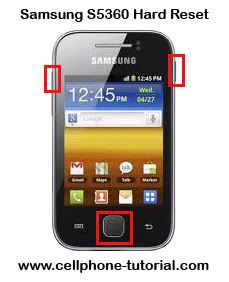
Samsung Galaxy Y S5360 Hard Reset Procedures


Warning

By performing a factory reset will delete and wipe all of your personal data, so we highly recommended to backup your important data and take the SD Card out from phone before performing factory reset.

Samsung Galaxy Y S5360 Hard Reset Procedures :

1. Power off phone
2. Press and hold Home Button ( middle ) + Volume Up + power on button
3. Wait for 5 second until Android System Recovery menu appear
4. There are 4 options

reboot system now
apply update from sdcar
wipe data/factory reset
wipe cache partition

5. Move the options to " Wipe data / factory reset " using volume down ( - ) button and menu button to confirm, because the touchscreen doesn't work in reovery mode
6. After the process done, phone will reboot.

In those steps:

1.)*2767*3855#
2.)*7465625*638*00000000*00000000#
3.)#7465625*638*00000000#

Now your phone is unlock forever Permanent

Samsung GALAXY Y (young) GT-S5360 Samsung logo only done via Odin

Samsung GALAXY Y (young) GT-S5360 Samsung logo only done via Odin


Status


Tools

Odin 1.85
File


1st Procedure Hard Reset but no lock

Press VOLUME UP + HOME + POWER and wait until the phone enter the Android System Recovery then select wipe date/factory reset & wipe cache partition


Procedure

1) Turn off your phone
2) Remove your SIM Card and SD Card
3) Extract previously downloaded firmware
4) Open ODIN 1.85 on your PC
5) Select from extracted archive: OPS-OPS, Bootloader, Phone-MODEM, PDA-CODE, CSC-CSC (leave EFS and One Package empty)


6) Connect your phone via USB into PC
7) When the screen is turned on hold POWER+VOLUME DOWN+HOME and wait until the phone enters the Download Mode


8) If ODIN detected and recognized your phone should light up the first square to the left side
9) Press “Start” button and wait, the process should take ~5 minutes


10) If all goes well your phone should reboot automatically
11) Square should change the color to blue and display “PASS” it means that flashing process was successful

Logs


Code:
<ID:0/018> Added!!
<OSM> Enter CS for MD5..
<OSM> Check MD5.. Do not unplug the cable..
<OSM> Please wait..
<OSM> DefaultCalDataWithBoot_S5360XXKI6_REV05.tar.md5 is valid.
<OSM> PDA_S5360XXKI6_REV05.tar.md5 is valid.
<OSM> MODEM_S5360XXKI6_REV05.tar.md5 is valid.
<OSM> GT-S5360-MULTI-CSC-OXXKI6.tar.md5 is valid.
<OSM> Checking MD5 finished Sucessfully..
<OSM> Leave CS..
<ID:0/018> Odin v.3 engine (ID:18)..
<ID:0/018> File analysis..
<ID:0/018> SetupConnection..
<ID:0/018> Initialzation..
<ID:0/018> Set PIT file..
<ID:0/018> DO NOT TURN OFF TARGET!!
<ID:0/018> Get PIT for mapping..
<ID:0/018> Firmware update start..
<ID:0/018> BcmBoot.img
<ID:0/018> NAND Write Start!! 
<ID:0/018> HEDGE_NVRAM8_RF_LE.bin
<ID:0/018> sysparm_dep.img
<ID:0/018> Sbl.bin
<ID:0/018> boot.img
<ID:0/018> system.img
<ID:0/018> userdata.img
<ID:0/018> param.lfs
<ID:0/018> BcmCP.img
<ID:0/018> Transmission Complete.. 
<ID:0/018> Now Writing.. Please wait about 2 minutes
<ID:0/018> Receive Response form LOKE
<ID:0/018> csc.rfs
<ID:0/018> RQT_CLOSE !!
<ID:0/018> RES OK !!
<ID:0/018> Completed..
<OSM> All threads completed. (succeed 1 / failed 0)
<ID:0/018> Removed!!
My Finish Product

Samsung S5360 galaxy young password removed!!!


SAMSUNG S5360 GALAXY YOUNG PASSWORD REMOVED!!


MODE

SAMSUNG S5360 GALAXY YOUNG

STATUS


PHONE PASSWORD


PROCEDURE'S


HARD RESET


PRESS VOLUME UP + HOME BUTTON + POWER BUTTO


CHOOSE WIPE DATE/FACTORY RESET BY PRESSING VOLUME DOWN AND HOME BUTTON TO ACCEPT


YES --- DELETE ALL USER


REBOOT SYSTEM NOW


Samsung Galaxi Young S5360 HardReset done


HP Dalam Keadaan Mati Trus Tekan Tombol Volume Up + Menu + Power Tahan Sampai Keluar Gambar Tulisan GALAXI young...baru lepas
Dan Keluar Pilihan...Android System Recovery
Aply Update From sdcar
wipe data/factory reset
Wipe cache partition
Pilih Wipedata/factory reset ......pake tombol volume up/Volume down...trus ada pilihan lagi......pilih delet all user data....tunggu proses sampai selesai.

SAMSUNG S5360 GALAXY YOUNG PASSWORD REMOVED!!!


SAMSUNG S5360 GALAXY YOUNG PASSWORD REMOVED!!!


MODEL


SAMSUNG S5360 GALAXY YOUNG


STATUS


PHONE PASSWORD


PROCEDURE'S


HARD RESET


PRESS VOLUME UP + HOME BUTTON + POWER BUTTON


CHOOSE WIPE DATE/FACTORY RESET BY PRESSING VOLUME DOWN AND HOME BUTTON TO ACCEPT


YES --- DELETE ALL USER


REBOOT SYSTEM NOW


Related Posts Plugin for WordPress, Blogger...

All Gsm Solution Headline Animator

Blogger Tips and TricksLatest Tips And TricksBlogger Tricks

Please Log in
