Showing posts with label Nokia Lumia 800. Show all posts

Nokia Lumia 800 Restore Factory Hard Reset Format Phone

If you have Nokia Lumia 800 problems and want to restore the smartphone then this post will help you to fix cellphone software problems. Due to software problem smartphone can hang, voice issues, data damages, camera stand by and blue tooth and wifi problems.
It will remove all the data ,contacts and apps that you installed
In touch screen mobiles it can be software problem also if touch is not working well.To solve these problems try the following steps.
Charge mobile phone battery, Make backup of your impotent contacts data and media files if possible and in most cases take out SIM and SD card.
After reset of Nokia Lumia 800 you will lose all the data and it will be impossible to get it back.so online backup is always important. Try to save all your data, backup on external device or hard drive.
So lets start the Nokia Lumia 800 Restore Factory, Nokia Lumia 800 Hard Reset.
Turn Off the mobile phone for few mints.
Make it Power On
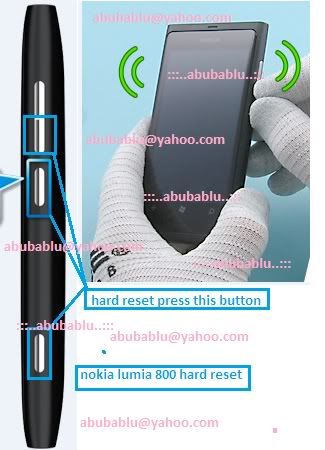
Turn off your Nokia Lumia 800. Press and hold the following buttons Camera + Volume down + Power until your phone vibrates, then release only the Power key and keep pressing the Camera + Volume down for a couple of seconds 4-5s.
On the Start screen,
Tap Settings > about phone.
Tap reset your phone, and then tap yes.
The factory setting for the lock code is 12345
Nokia Lumia 800 Restore Factory Hard Reset Format Phone

If you have Nokia Lumia 800 problems and want to restore the smartphone then this post will help you to fix cellphone software problems. Due to software problem smartphone can hang, voice issues, data damages, camera stand by and blue tooth and wifi problems.
It will remove all the data ,contacts and apps that you installed
In touch screen mobiles it can be software problem also if touch is not working well.To solve these problems try the following steps.
nokia Asha 200 Camera Problem Solution Jumper Ways
Charge mobile phone battery, Make backup of your impotent contacts data and media files if possible and in most cases take out SIM and SD card.
After reset of Nokia Lumia 800 you will lose all the data and it will be impossible to get it back.so online backup is always important. Try to save all your data, backup on external device or hard drive.
So lets start the Nokia Lumia 800 Restore Factory, Nokia Lumia 800 Hard Reset.
Turn Off the mobile phone for few mints.
Make it Power On
Turn off your Nokia Lumia 800. Press and hold the following buttons Camera + Volume down + Power until your phone vibrates, then release only the Power key and keep pressing the Camera + Volume down for a couple of seconds 4-5s.
On the Start screen,
Tap Settings > about phone.
Tap reset your phone, and then tap yes.
The factory setting for the lock code is 12345

Nokia Lumia 800 No Network Low Signals Problems Solution

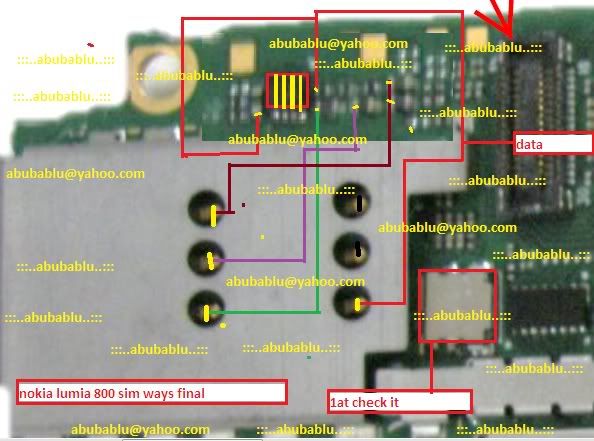
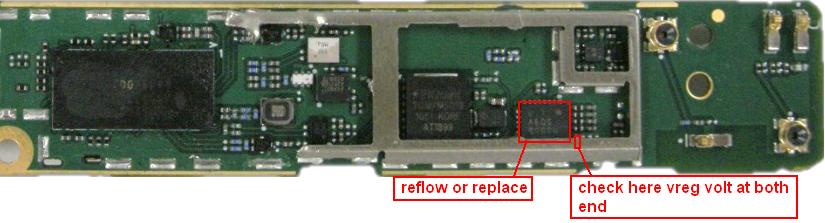
Nokia Lumia 800 No Network Low Signals Problems Solution is possible with a few steps that I am going to write in this post.In diagram bellow you can see red lines around Ic and a capacitor.Nokia Asha 311 Mic Problem Jumpers Ways Solution
Nokia Lumia 800 No Network Low Signals Problems Solution
Clean these parts with electronics cleaner and apply hot air so that it can be dry. Re sold Ic and Check Vreg voltage on the capacitor.

Nokia Lumia 800 Restore Factory Hard Reset Remove Pattern Lock

Nokia Lumia 800 Restore Factory Hard Reset Remove Pattern Lock
It will remove all the data ,contacts and apps that you installed
Before you buy a new cell phone or a new tablet, try the following procedure to repair your appliance. Charge first battery, make backups of your important data, if possible, and in most cases, remove SIM and SD card. Unable to recover data after performing a hard reset, Internet backup is always important. For all data, a backup should be performed on an external device, hard disk or system support band. With or without insurance, if your lost cell phone, damaged or stolen, at least, is a backup copy of your valuable data in a safe place.
Nokia Lumia 800 hard reset
Hard reset via Keys:
Charge your phone. Turn off your Nokia 800. Hold Volume Down + Camera + Power
Release Power, but hold Volume Down + Camera for 5 secs. Release buttons
Phone will start with factory settings without prompting
First try this to soft reset your Nokia 800 Lumia. Press and hold the Volume down and Power buttons until it vibrates, after that you have to release all the keys then phone will vibrate 3 times.
To hard reset your Nokia Lumia 800 using key combination
Turn off your Nokia Lumia 800. Press and hold the following buttons Camera + Volume down + Power until your phone vibrates, then release only the Power key and keep pressing the Camera + Volume down for a couple of seconds 4-5s.Nokia Lumia 800 Restore Factory Hard Reset Remove Pattern Lock
Nokia Lumia 800 Restore Factory Hard Reset Remove Pattern Lock
Nokia Lumia 800 Restore Factory Hard Reset Format Phone.So lets start the Nokia Lumia 800 Restore Factory, Nokia Lumia 800 Hard Reset.Turn Off the mobile phone for few mints.Nokia Lumia 800 Remove Pattern Lock.

Nokia Lumia 800 Restore Factory Hard Reset Remove Pattern Lock

Nokia Lumia 800 Restore Factory Hard Reset Remove Pattern Lock
It will remove all the data ,contacts and apps that you installed
Before you buy a new cell phone or a new tablet, try the following procedure to repair your appliance. Charge first battery, make backups of your important data, if possible, and in most cases, remove SIM and SD card. Unable to recover data after performing a hard reset, Internet backup is always important. For all data, a backup should be performed on an external device, hard disk or system support band. With or without insurance, if your lost cell phone, damaged or stolen, at least, is a backup copy of your valuable data in a safe place.
Nokia Lumia 800 hard reset
Hardreset via Keys:Samsung Galaxy Mini 2 S6500D Restore Factory Hard Reset Remove Pattern Lock
Charge your phone. Turn off your Nokia 800. Hold Volume Down + Camera + Power
Release Power, but hold Volume Down + Camera for 5 secs. Release buttons
Phone will start with factory settings without prompting
First try this to soft reset your Nokia 800 Lumia. Press and hold the Volume down and Power buttons until it vibrates, after that you have to release all the keys then phone will vibrate 3 times.
To hard reset your Nokia Lumia 800 using key combination
Turn off your Nokia Lumia 800. Press and hold the following buttons Camera + Volume down + Power until your phone vibrates, then release only the Power key and keep pressing the Camera + Volume down for a couple of seconds 4-5s.
Nokia Lumia 800 Restore Factory Hard Reset Remove Pattern Lock
Nokia Lumia 800 Restore Factory Hard Reset Format Phone.So lets start the Nokia Lumia 800 Restore Factory, Nokia Lumia 800 Hard Reset.Turn Off the mobile phone for few mints.Nokia Lumia 800 Remove Pattern Lock.

Nokia Lumia 800 RM-801 Latest Flash File Version 1750.0805.8779 download now

Download Nokia Lumia 800 RM-801 Latest Flash File Version 1750.0805.8779 download now


Free Download Nokia Lumia 800 RM-801 Flash File / Firmware V1750.0805.8779 download now 

Nokia Lumia 800 RM 801 Flash files download

Nokia Lumia 800 RM 801 Flash files download now 

update flash file 

download and enjoy it

Nokia Lumia 800 RM 801 Flash files download

Latest Version 1750.823.8858.12460 
FILE 1 
FILE 2 
FILE 3 
FILE 4 
FILE 5

successfully Ulock Bootloader and sim lock Lumia 800 RM-801

Thanx infinity best

Info

Quote:
Phone found!
WP7x Nokia Phone detected
Read info... Ok

=== Main Info ===
Phone : RM-801|NOKIA Lumia 800
Phone SwVer : 1750.0805.8773.12220
Phone IMEI : 359289045264187
ProductCode : 059L733
HW Version : 112.1402.2.3
=== Other ===
Life Timer : 0
Battery Life : 94
SerialNum : 0031FD4AB
Base Code : 059J2N6
ModuleCode : 0205051
NCSD Ver : 1.9
BT MAC : 6CE907348CE10000000000
Wlan MAC : 6CE9071B2CBB00
Public ID: DF89264EC33BC121B13954F6E41739

Unlock BootLoader

Quote:
Phone found!
WP7x Nokia Phone detected
Read info... Ok

Setting device to OSBL mode...
Waiting for USB device...
Connection opened successfully
Establish connection with device...
Kick ...
OSBL alive
Init Ok
OSBL info
Prt : 1.1
Ver : 1.1.0.6
Bld : 12
Tms : 17.02.2012 / 12:40:05

osbl.cer , Hash : 0C203F23776466E755E9955A9F8F9A39A0888B8E
osbl.mbn , len : 0x000D4A28 , Type : Data
Will flash 1 regions
OSBL flashing done

Flashing done!
Reboot device Ok

All done, Phone will Reboot Now
If phone Power On - Wait, until BEST detect it
Back to Extended, Press Check/Info
Check/Info

Quote:
Phone found!
WP7x Nokia Phone detected
Read info... Ok

Setting device to OSBL mode...
Waiting for USB device...
-> Phone not found..
Active QC/DLOAD not found, trying enumerate drives...
Checking for device...
Phone disconected!
Unlock

Quote:
Connect phone on selected interface...

Qualcomm MMC Storage , rev : 2.31
Drive space : 14 GiB
Drive Index : 1

Processing MBR...
[0] MBR
Name : SECBOOT
Start : 0x00000001
Lenght : 0x000003E8
[1] MBR
Name : OSBL
Start : 0x000003E9
Lenght : 0x00000BB8
[2] MBR
Name : MODEM_FS
Start : 0x00000FA1
Lenght : 0x000493E0
[3] MBR
Name : EBR
Start : 0x0004A381
Lenght : 0x01D51C7F
Processing EBR...
[4] EBR
Name : NK_PMM
Start : 0x0004A386
Lenght : 0x00000080
[5] EBR
Name : SFSNV
Start : 0x0004A406
Lenght : 0x00001800
[6] EBR
Name : SFSBKP0
Start : 0x00060000
Lenght : 0x00001800
[7] EBR
Name : SFSBKP1
Start : 0x00061800
Lenght : 0x00001800
[8] EBR
Name : WP_USER
Start : 0x00080000
Lenght : 0x01D38FFF

Check product info...
Current OSBL mode : QUALCOMM
Found : SeaRay
Model : RM-801 , RM-819
Model : Lumia 800
Phone Id set to : 059L733_0031FD4AB

Processing Lumia Wp7x Patch Unlock
Found Location #1
State : Not Patched
Patch ...
Patch Ok
Found Location #2
State : Not Patched
Patch ...
Patch Ok

Unlock Code (PIN) : 00000000
Unlock Code (PUK) : 0000000000
1. Power Up phone
1.0 Press Restart button
1.1 Or Reconnect Battery / 15sec. hold PowerOn, after PowerOn
2. Enter code (PIN or PUK)
3. After PIN/PUK accepted, you can restore state via "Restore SimLock state"
(c) Wp7x Patch Unlock : Bph&co (Genie Projects)
All done!

Lumia eMMC drive disconected!

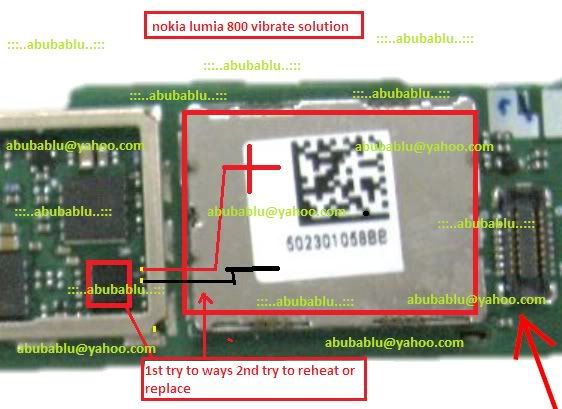
Nokia Lumia 800 All Solution

NOkia Lumia 800 All Solution


NOkia Lumia 800 All Solution Free
Nokia lumia800 Hard Reset
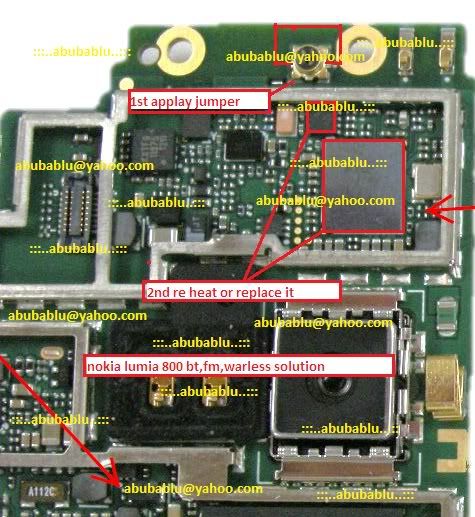
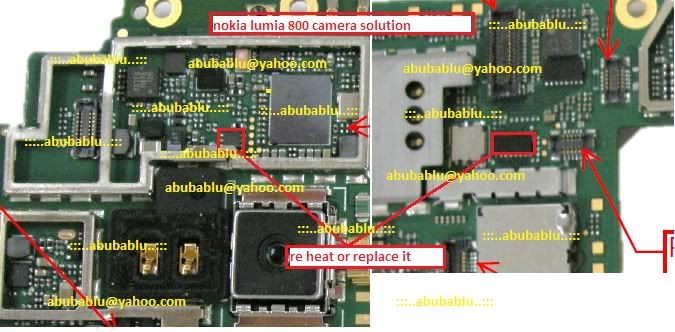
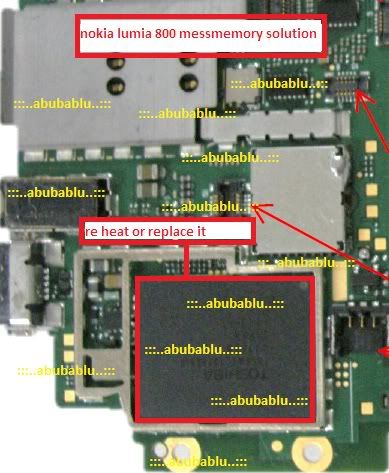
Nokia lumia 800 Camera Solution
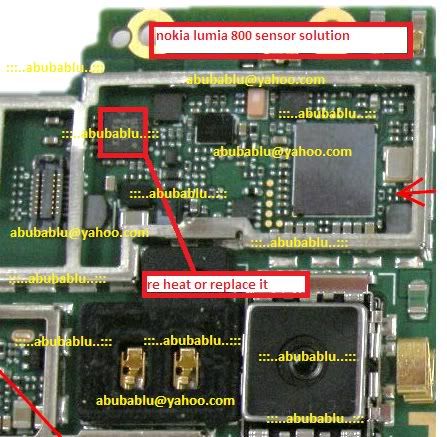
Nokia Lumia 800 Sensor0 Solution
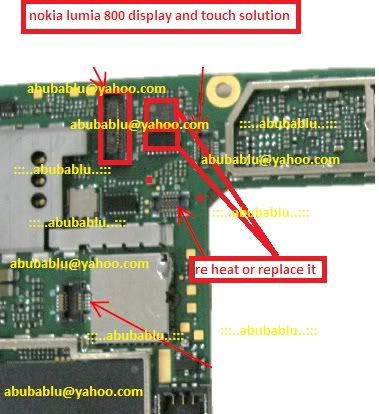
Display And Touch Solution
NOkia Lumia800 Sim Solution
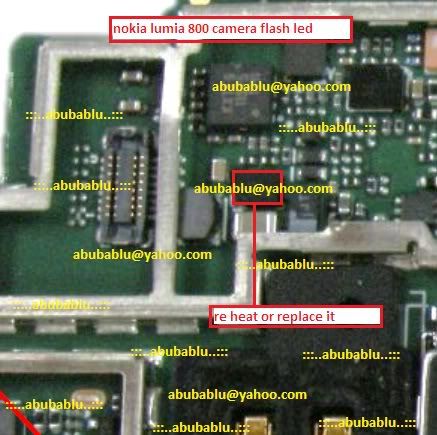
Nokia lumia 800 Camera LED Solution
Nokai Lumia 800 Bluetooth Solution
Quote:
download here
__________________

How to Hard Reset Nokia Lumia 800

Soft Reset
With most device you would be able to pull out the battery and a soft reset is done, but with the Nokia Lumia 800 you will have to do something differently, here's how:
1. Press and hold the Volume Down and Power keys until you have it vibrates 3 times, then release all the keys.
nokia-lumia-800

Hard Reset
When soft reset does not do the trick, then you ought to use this option. Please note, if you try this option make sure that you have backup all your data.
1. Proceed to backup your valuable data.
2. Next turn off your phone.
3. Now press and hold the Volume Down, Power and Camera key simultaneously until you feel your phone vibrates, then release the Power key and continue to hold the Volume Down and Camera key for a further 5 seconds. 
Now your phone should start to return to the factory default settings.

Reset Via Menu Settings

1. Go back to the Home screen.
2. Click on the right arrow right-arrow-windows-phone-7 button.
3. Then scroll down the screen and select Settings.
settings
4. Now scroll down and select About.
windows-7-about
5. Then select Reset your Phone near the bottom of the screen.
windows-7-reset
6. Tap on the Yes button when the warning screen appears.
windows-7-reset-warning
Now wait for the device to reset it self.
Related Posts Plugin for WordPress, Blogger...

All Gsm Solution Headline Animator

Blogger Tips and TricksLatest Tips And TricksBlogger Tricks

Please Log in