Showing posts with label Nokia C5. Show all posts

Nokia C5 hardware solution - No Earpiece Speaker Audio Sound solution

Here's a solution that may help fix and repair hardware related damaged on Nokia C5 No Earpiece Speaker Audio Sound  output. If the earpiece speaker already been check and seems to be working fine but still no audio sounds can be heard. you may need to check those certain components indicated on the solution.

nokia c5 eapiece speaker jumper ways

Repair hints:
1. Check/replace the ear speaker
2. Clean the speaker terminal pads
3. Check/replace the filter coil
4. Check/ replace the ESD filter or remove it,

Nokia C5 Charger Not Supported Error Problem Solution

This solution may help fix if the Nokia C5 shows "charger not supported error when the battery charger is plug-in. If the error message shows, this probably cause by a faulty hardware components on Nokia C5 PCB board.

Just refer to the solution below and locate the highlighted components for it is part of  the charging indication components.


Nokia C5 Charger Not supported problem solution

Nokia
Hints for repair a Nokia C5 charger not supported problem:
1. Try to use another phone's battery and charger.
2. Check/clean the battery terminals and connector
3. Check/ replace the 47K resistor as shown on the solution above

Nokia C5 Not Charging Problem Repair Solution

Here's the solution for Nokia C5 Not Charging problem , this simple solution provides the basic details on how to fix the problem. Just refer to the solution below and follow some steps procedures on how to troubleshoot the problem.
This solution may works on 'charger no response indication' when any working battery charger is plug-in to the DC jack.


Nokia C5 Not Charging problem Solution
nokia c5 charging problem jumper ways
Repair hints for Nokia C5 Not Charging problem:
1. Visually check the charging pin connector( DC jack) for possible damaged, clean,fix if the terminals is misaligned or replace it.
2. Clean the charging pin terminal contact pads.
3. Check the battery and try using another working phone's battery.
4. Check the battery terminals, clean if oxidized.
5. Check/replace the fuse
6. Check /replace the chip diode
7. If the above procedures doesn;t fix the problem, the possible faulty is the GAZOO IC, reworking or replacing it will only fix the problem.

Nokia C5 Keypad Not Working - Full Repair Solution

Here's a solution that may work to solve Nokia C5 keypad malfunction or not responding.
This solution may help as a guide to repair certain keys that does not working when being pressed. If the device suffered wet or water damaged or any means of liquid most oftentimes that keypad may stop working due to some short circuit occurred and or oxidation may build up due to a liquid residues.
If this happens you may need to clean first the keypad membrane and contact pads using a liquid cleaner.

If all the keypad keys already been cleaned but still there are particular key may still not work, you can used the solution below to trace that particular and check if the connection line paths is not open or cut-off.


Nokia C5 keypad not responding - connection tracing repair solution
nokia c5 keypad filter IC jumper ways solution tracks
The keypad circuit of Nokia C5 used to EMI-ESD filter IC's and mounted near to the keypad pin connector.
There are some factors that this keypad filter IC will breakdown or become faulty  due to excessive electrostatic discharge and electromagnetic interference.


Hints for troubleshooting Nokia C5 keypad malfunction:
a) Clean the keypad membrane and contact pads.
b) Check the keypad flex wire if damaged, you may need to replaced the whole keypad flex matrix if the flex is already damaged.
c) Identify which particular keys were not working, then trace its connection between the other keys. If all of the keys connected in the same line paths are not working and the flex is okay, you may then suspects the problem lies on the keypad filter IC.
d) Replace the keypad filter IC.

Nokia C5 MIC mouthpiece not working solution

Here's the solution covers for Nokia C5 microphone problem repair. This solution shows the location of the digital microphone on the PCB board, including the line paths that also needs to be trace and check like the microphone supply voltage, MIC clock and MIC data signal line paths.

These three line paths which need to check first before attempting to replace the Digital Microphone Module.


Nokia C5 Microphone Failure Repair Solution
nokia c5 solution mic ways repair tracks
The mic supply voltage line paths is came from the power management chip labeled as GAZOO. while the corresponding Data and Clock  signal line paths is located near the CPU IC. There is a 47 ohms filter resistor is connected across the MIC clock signal, check and or replace it if found damaged or faulty.
If all the line paths is seems all okay, proceed to replace the MIC module.

Nokia C5 Handsfree Headset problem solution ways

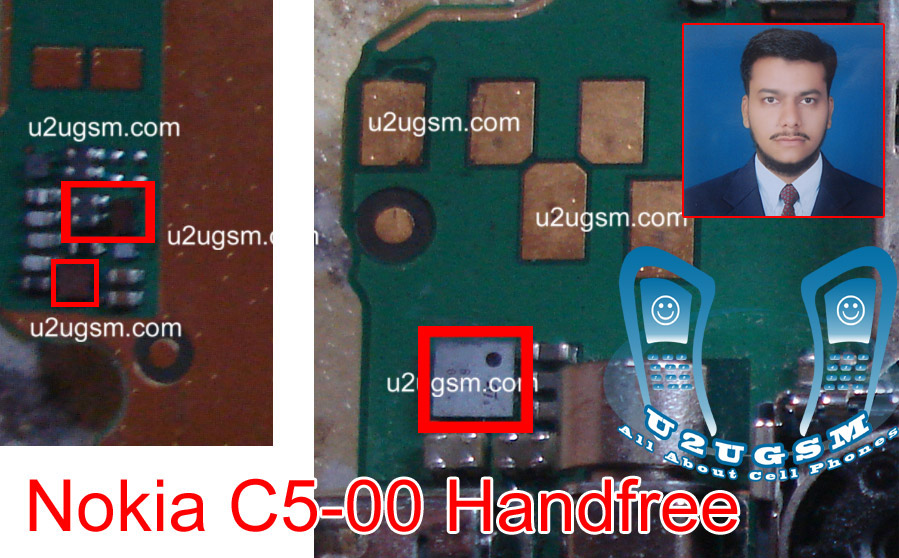
Nokia C5 handsfree open or headset not working in Nokia C5 can be solve by following the diagram bellow. Look at the diagram bellow and in it you can see some parts that are in line with red color. These parts are used to control head set and head phone in Nokia C5.nokia Asha 202 Ringer problem solution ways
Nokia C5 Handsfree Headset problem solution ways
Nokia C5 hands free problem can be solve by these few steps that I am posting here.Clean all these components that are used in head set function in Nokia C5. Apply hot air to dry the mother board and keep in mind do not apply much heat because to much heat can damage the mother board or harm you skin.
Re sold and re flow of these parts can also solve the head set hand free problem in Nokia C5.If all above techniques can not solve Nokia C5 head set problem you can replace these parts to solve Nokia C5 handfree problem.
for more detail and new tips and tricks about cellphone service problem keep visiting this page we will update cellphone service diagrams timely with new cellphone diagrams.some related post are also given bellow you can read them also for more information about cellphone.

Nokia C5 Lcd display Solution White Blank Display Problem Jumpers

Nokia C5 Lcd problem solution, Nokia C5 Lcd White display, Nokia C5 blank display. All these problems can be solve by following a few steps that I am going to describe here in this Solution of Nokia C5.Look at diagram bellow.nokia Asha 202 No Network Low Signal Problem Solution Jumpers
Nokia C5 Lcd display Solution White Blank Display Problem Jumpers
In above diagram you can see some red lines these lines are given to identify components that are used in Nokia C5 display and lcd functions.After dis assembly of Nokia C5 replace lcd panel with new on and check it may can be the fault of lcd.
If replacement of lcd can not solve the display problem in Nokia C5.You can clean mother board and specially these parts that are inline with red color. Because there may can be some rust carbon or water damages.
Dry the mother board with hot air.And re sold or re flow these parts that can solve Nokia c5 display problem. Nokia C5 display solution is also possible with replacement of these parts.
for more detail and new tips and tricks about cellphone service problem keep visiting this page we will update cellphone service diagrams timely with new cellphone diagrams.some related post are also given bellow you can read them also for more information about cellphone.

Nokia C5 lcd light solution Problem ways jumpers

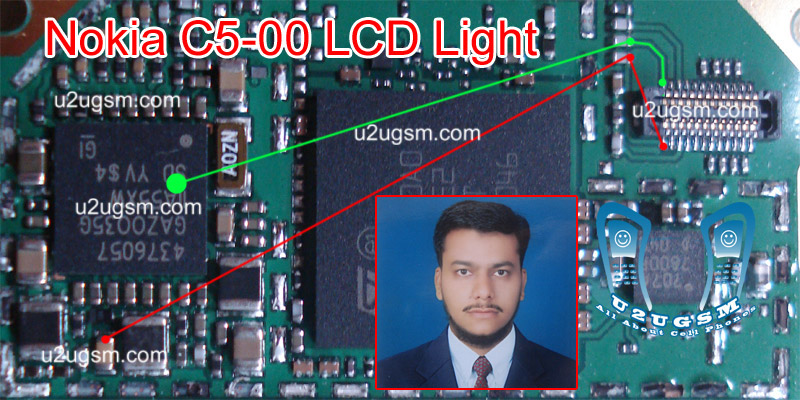
nokia C5 lcd light is not working, Nokia C5 display light is not lighting. Then these problems can be solve by following diagram that is given bellow to solve Nokia C5 light solution in this post.nokia Asha 202 Speaker Ear peace problem solution jumper ways
Nokia C5 lcd light solution Problem ways jumpers
In above diagram you can see two color lines that are used in light function of LCD in Nokia C5. Check these Parts adn tracks with meter.If any of these path is missing you can apply jumpers as shown in above diagram for Nokia C5 light solution.
You can replace lcd panel because some time it can be the fault of lcd lights.and mother board is providing the proper voltage to light.
for more detail and new tips and tricks about cellphone service problem keep visiting this page we will update cellphone service diagrams timely with new cellphone diagrams.some related post are also given bellow you can read them also for more information about cellphone.

Nokia C5 keypad light solution problem jumper ways

Nokia C5 keypad light solution is possible with a few basic steps that are given in this post and by following diagram to repair keypad light in Nokia C5. The repairing diagram for Nokia C5 have some parts in line with red color.Nokia Asha 202 Touch Screen Problem Solution IC
Nokia C5 keypad light solution problem jumper ways
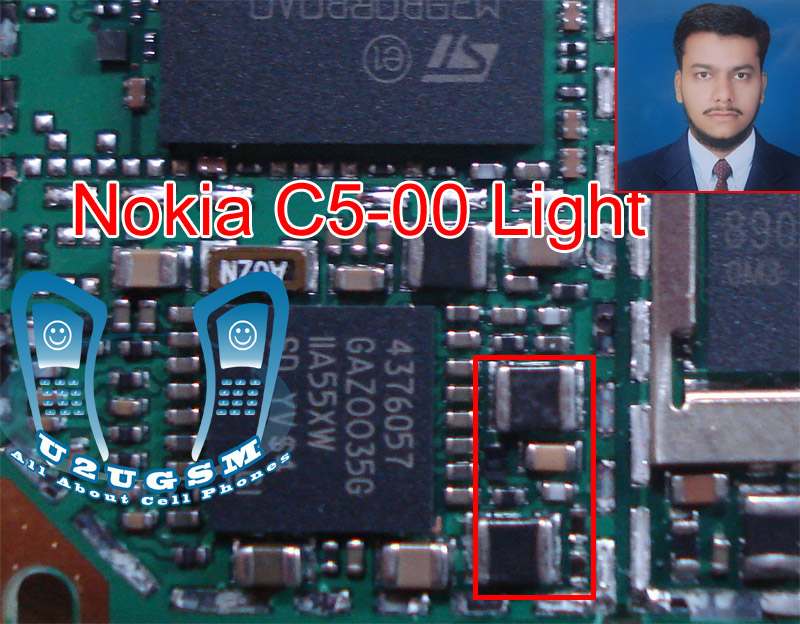
These parts are used in Nokia C5 keypad light functions. After disassambly of Nokia C5 clean these parts that are inline with red color in above keypad light repairing diagram for Nokia C5. Because there can be rust or carbon due to water damages.
May you feel smell like burn parts. Apply hot air to dry the mother board.And do not apply much heat it can damage the mother board.Re sold or re flow of these parts can alos solve Nokia C5 keypad light problem.
Replace these parts and keypad led lights if the above solutions did not work for Nokia C5 keypad light solution.
for more detail and new tips and tricks about cellphone service problem keep visiting this page we will update cellphone service diagrams timely with new cellphone diagrams.some related post are also given bellow you can read them also for more information about cellphone.

Nokia C5 test mode local mode problem solution ways

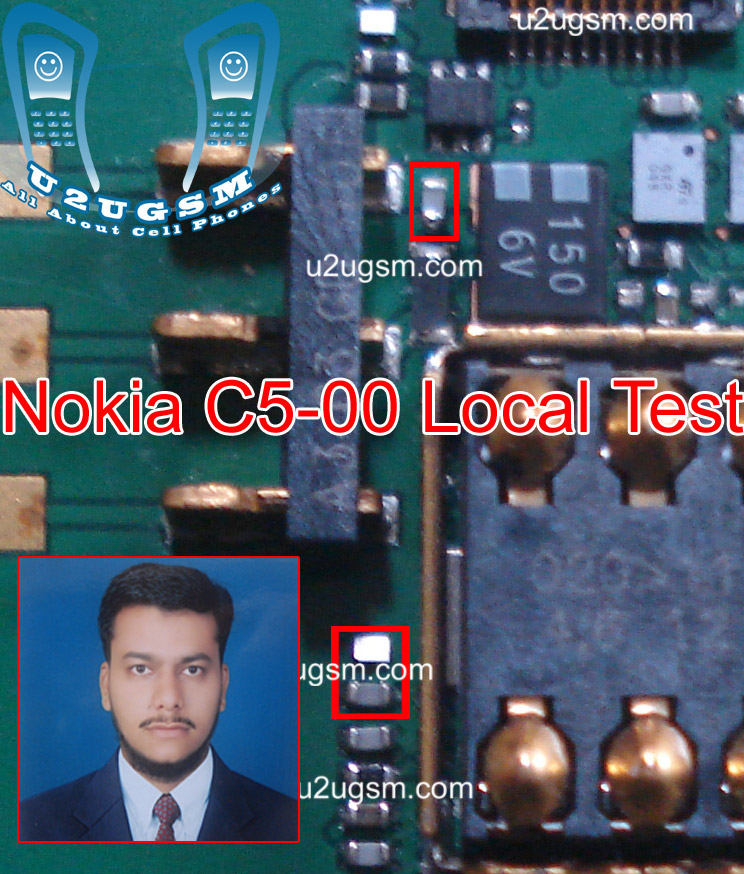
When we power on Nokia C5 and it shows notification of Local mode Test mode in its display screen. It can be fault of battery or water damages.Solution of Nokia test mode and Nokia C5 local mode solution is here in this post.Nokia Asha 202 Touch Screen Solution Jumpers Problem Ways
Nokia C5 test mode local mode problem solution ways
In above repairing diagram for Nokia C5 local mode solution and Nokia C5 test mode solution a few parts are in line with red color.Replace battery to solve test mode and local mode in Nokia C5.
After disassambly clean all these parts that are in line with red color with electronics cleaner because there can be some rust or carbon due to water damages.Apply hot air to dry the mother board of Nokia C5 for solving Local mode test mode.
re sold or re flow these parts tos solve nokia c5 test mode problem solution , Nokia local mode problem solution.
for more detail and new tips and tricks about cellphone service problem keep visiting this page we will update cellphone service diagrams timely with new cellphone diagrams.some related post are also given bellow you can read them also for more information about cellphone.

nokia c5 only vibrate no power on

nokia c5 only vibrate no power on problem can be cause of water damages. So after disassemble clean the whole mother board and apply hot air to make it dry. Do not apply much hot air to because it may can harm your skin and damage the board.nokia 101 lcd ways jumpers solution
nokia c5 only vibrate no power on
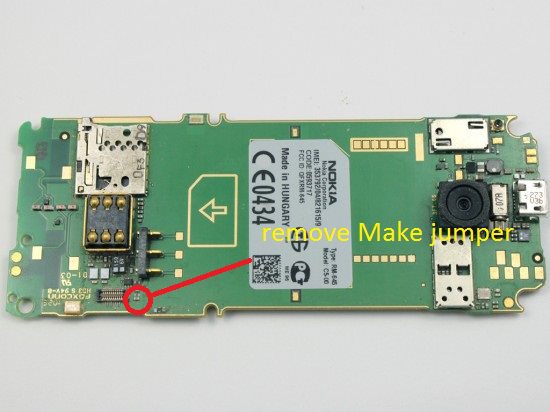
In the above diagram you can see a resistance remove this if only cleaning the board can not solve nokia c5 only vibrate no power on problem.

Nokia C5 no power solved via hardware

hi to all i just wanna share this simple tricks on c5 no power....

Problem and history: No power, not drop, not water damage, just no power

heres my simple trick....

first easily and take care to remove the guard plate of the ic...


then reheat or shake this ic...


easy like that and the phone succesfully revive without flashing


Related Posts Plugin for WordPress, Blogger...

All Gsm Solution Headline Animator

Blogger Tips and TricksLatest Tips And TricksBlogger Tricks

Please Log in