Showing posts with label Nokia C2-06. Show all posts

Nokia C2-06 Insert sim ways problem solution jumpers

Nokia C2-06 insert sim problem, Sim is not working in Nokia C2-06, Sim is not Valid, Single Sim is not working in Nokia C2-06
Tools:-
Nokia T4 and T5 key, Electronic meter, Electronics Cleaner, Hot Air, Solding Iron, Jumper Wire.
Nokia C2-08 Voluem Up Down Keys Not Working Problem Solution Jumpers
Nokia C2-06 Insert sim ways problem solution jumpers
Diagnostic and Solutions.
if sim is not working in Nokia C2-06 is can be cause of water damage or missing components. Use different sim and if sim is not working then de assemble Nokia C2-06.
Once Mobile phone is disassemble check all these parts that are given in above diagram and apply electronics cleaner. Apply hot air so that it can be dry but not to much because it can damage the mother board or may can harm your skin.
these different color lines are indicating different path and tracks that are used in sim function in Nokia C2-06 so if nay of them is missing apply that jumper as shown in diagram to solve insert sim problem in Nokia C2-06
If single sim is not working out of these two you can only jumper those parts that are used by it. And to find prints and track you can see above diagram.
Warnings:
Do not apply to much heat it can damage the mother board and harm your skin.
When apply jumpers make sure the do not be ground with other prints.It can short the mobile phone.
Remove Sim Ic with hot air because with Solding iron it might can damage prints also.
for more detail and new tips and tricks about cellphone service problem keep visiting this page we will update cellphone service diagrams timely with new cellphone diagrams.some related post are also given bellow you can read them also for more information about cellphone.
Nokia C2-06 Lcd Display Problem Solution Ways Jumpers

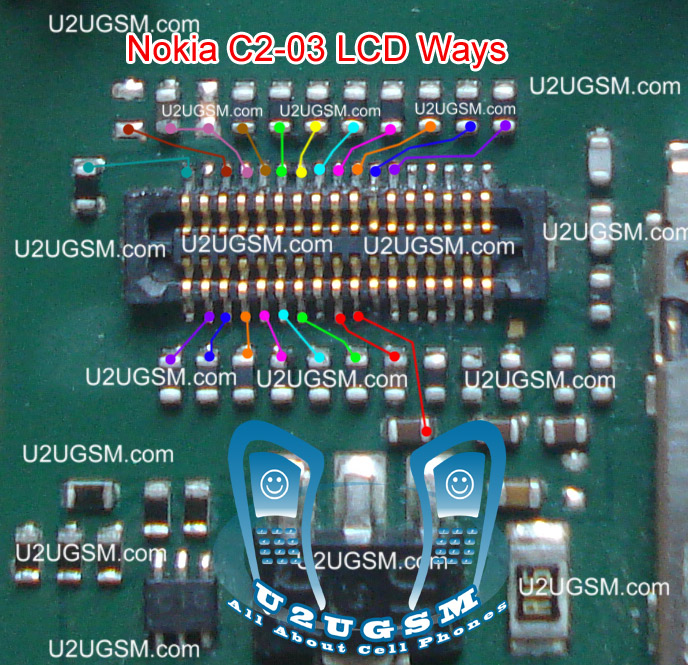
Nokia C2-06 Blank Lcd Display, Nokia C2-06 White Lcd Display, Nokia C2-06 Lcd Jack Damage Prints Missing.
Tools:-
To solve lcd display problem in Nokia C2-06 we have required a few tools and components.
Nokia screw Driver t5 and t4 for opening screw .
Lcd panel for Nokia C2-06
Electronics Cleaner for rust or water damage.
Hot air to dry the mother board.
Lcd Jack if we have to replace it.
Nokia 100 Not Charging Problem Solution Jumper Ways
Nokia C2-06  Lcd Display Problem Solution Ways Jumpers

Diagnosting & Solution:
After disassemble of Nokia C2-06 remove lcd and check lcd jack and its near by area for rust or water damages.
If here is some carbon on parts or at lcd jack.
Apply electronics cleaner and dry it with hot air for a few mint.
Do not apply so much heat it can harm your skin and mother board parts also.
Check with Lcd and if it is still blank replace with new one.
It might be possible that lcd jack pins are missing or not getting connected with lcd so change it.
Check all these links as given in above diagram in different colors so that you can find them easily.
Warnings:
Do not apply to much heat it can damage the mother board.
Make sure mother board is dry proper when you apply electronics clean.
Check Lcd jack and when removing it make sure solder has been melt.
If solder has not proper melt and you try to remove lcd jack prints might be damage.
When you replace lcd make sure lcd strip is proper fixed.
It can be damage when you assemble the phone if not in proper place.
for more detail and new tips and tricks about cellphone service problem keep visiting this page we will update cellphone service diagrams timely with new cellphone diagrams.some related post are also given bellow you can read them also for more information about cellphone.
Nokia C2-06 MMC Memory Card Problem Solution Ways

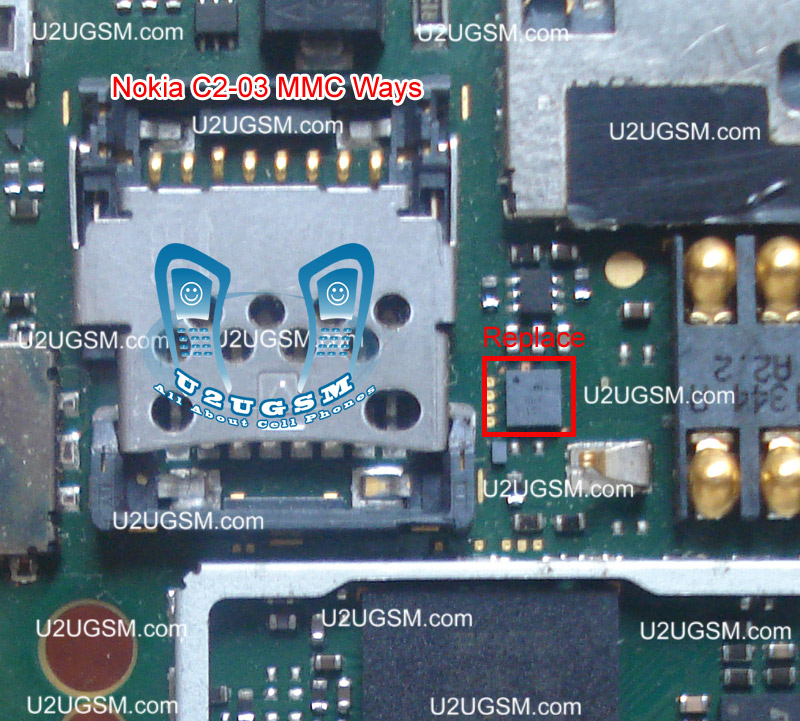
if Nokia C2-06 MMC is not working or it do not accept memory card it can be cause of water damage and rust. It can be due to MMC jack and damage pins. And this problem can be reason of MMC I.C So lets check all these parts and try to Repair Memory card Problem in Nokia C2-06.
Nokia 5800 memory card corrupted MMC problem solution
Nokia C2-06 MMC Memory Card Problem Solution Ways

The above diagram have a red line to show you which parts are used in Memory Card function so check these parts and in first step try to clean them with electronics cleaner and apply some hot air to dry it.
Once it is dry check and if not working then replace this I.C to solve memory card problem in Nokia C2-06.
for more detail and new tips and tricks about cellphone service problem keep visiting this page we will update cellphone service diagrams timely with new cellphone diagrams.some related post are also given bellow you can read them also for more information about cellphone.
Nokia C2-06 Charger Not Supported Problem Solution Ways

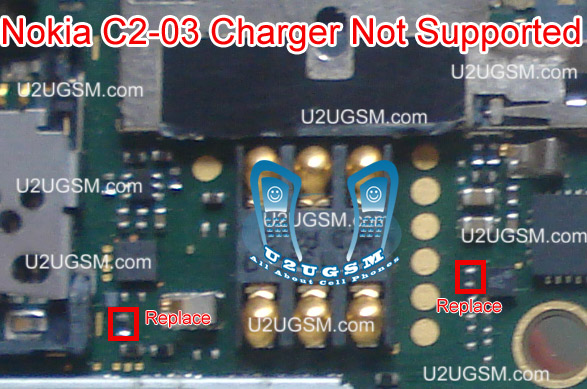
Plug in Charging pin into charging jack of Nokia C2-06 and if it shows an indication message Charger Not Supported it can be due to these few parts that are given bellow in diagram.So after disassemble of Nokia C2-06 clean these parts and area with electronics cleaner.
NOKIA 5230 KEYPAD IC JUMPER KEYPAD SOLUTION
Nokia C2-06 Charger Not Supported Problem Solution Ways
Apply hot air and make it dry.Resold these parts indicated with red lines in above diagram to solve Charger Not Supported in Nokia C2-06
You can take these parts from other models of nokia also to solve charging problem in nokia C2-06
for more detail and new tips and tricks about cellphone service problem keep visiting this page we will update cellphone service diagrams timely with new cellphone diagrams.some related post are also given bellow you can read them also for more information about cellphone.

Nokia C2-06 Ringer Problem Solution Jumper Ways

Nokia C2-06 ringer HF is not working, Nokia C2-06 Ringer Speaker is not working, Nokia C2-06 can not play music. We can not here voice during loud speaker in nokia c2-06.
Tools:-
Nokia key T4 and T5
Hot air.
Solding Iron.
Electronics Cleaner.
Nokia C2-06 Ringer,Nokia 2330 Classic Charger Not Responding or Not Supported
Nokia C2-06 Ringer Problem Solution Jumper Ways
Diagnostic & Solutions:-
If Nokia C2-06 is not abble to ring a bell and we can not use loud speaker it might be fault of ringer or it may not be attached with mother board.
it can be damage or might be its not in proper location.It can be cause of Water damages and missing components,So lets solve the problem in a few simple steps as given in above diagram.
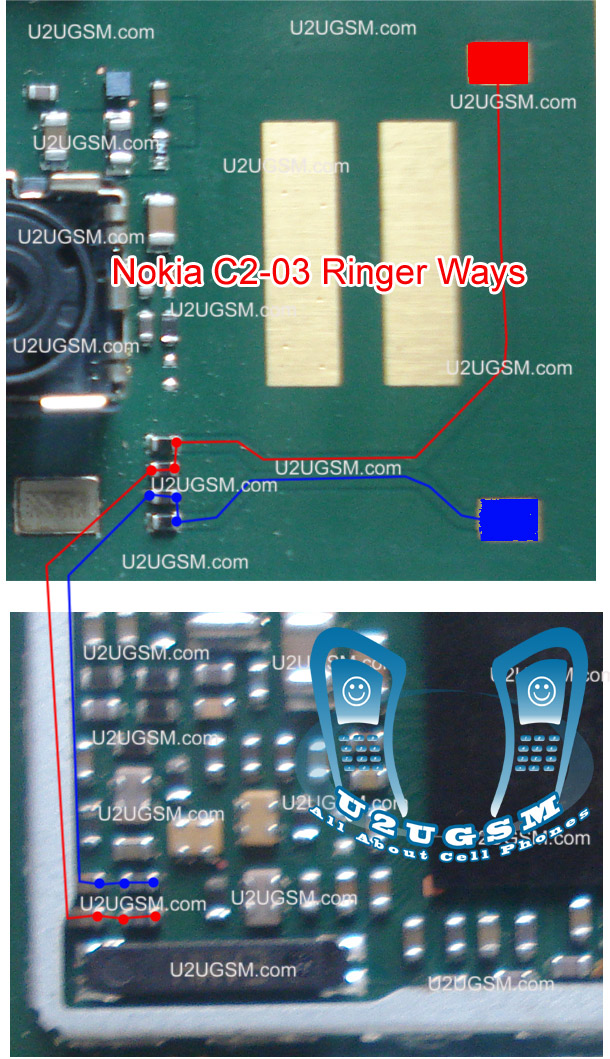
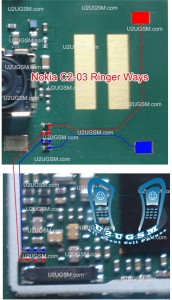
Disassemble Nokia C2-06 and check ringer points with electronics meter.If ringer shows good value then check point on the mother board and if the have also a good value it can be cause of miss fitting.
So assembly with proper placements and tight the screw and try it if not working then replace ringer with new one.If you find some prints missing then apply jumpers as given in above diagram. There are two different color lines Red and Blue.These lines indicates the negative and positive prints of ringer in Nokia C2-06 so apply these jumper to solve ringer problem in nokia C2-06
Warnings:-
Do not apply much heat with hot air it can damage the mother board and your skin.
Keep in mind about placement of ringer because it is not proper ringer will not work.
for more detail and new tips and tricks about cellphone service problem keep visiting this page we will update cellphone service diagrams timely with new cellphone diagrams.some related post are also given bellow you can read them also for more information about cellphone.
nokia c2-06 light solution 100% tested

nokia c2-06 light Jumper Solution nokia c2-06 light problem com, c2-06 light problem solution, Light sollution for nokia c2-06, nokia c2-06 light solution, nokia c2-06 light not displaying, nokia c2-06 backlight solution, nokiac2-06 light problem, gsm forum nokia c2-06 light problem, nokia c2-06 light salution, nokia c2-06 light jumper solution, c2-06 light solution,Nokia 2323 Classic speaker ear piece problem solution jumper ways nokia c2-06 light solution
nokia 1209 lcd jumper, c2-06 light jumper solution , nokia c2-06 light problem , c2-06 nokia light jumper , nokia c2-06 light jumper , nokia c2-06 light problem , nokia c2-06 light solution , Nokia c2-06 backlight solution , nokia c2-06 light not working, nokia c2-06 light jumper, nokia c2-06 light ways, nokia c2-06 c2-06 light jumpers , c2-06 nokia light solution,

Nokia C2-06 Ringer Problem Solution Jumper Ways

Nokia C2-06 ringer HF is not working, Nokia C2-06 Ringer Speaker is not working, Nokia C2-06 can not play music. We can not here voice during loud speaker in nokia c2-06.
Tools:-
Nokia key T4 and T5
Hot air.
Solding Iron.
Electronics Cleaner.
Nokia C2-06 Ringer,
Nokia C2-06 Ringer Problem Solution Jumper Ways
Diagnostic & Solutions:-
If Nokia C2-06 is not abble to ring a bell and we can not use loud speaker it might be fault of ringer or it may not be attached with mother board.
it can be damage or might be its not in proper location.It can be cause of Water damages and missing components,So lets solve the problem in a few simple steps as given in above diagram.
Disassemble Nokia C2-06 and check ringer points with electronics meter.If ringer shows good value then check point on the mother board and if the have also a good value it can be cause of miss fitting.
So assembly with proper placements and tight the screw and try it if not working then replace ringer with new one.If you find some prints missing then apply jumpers as given in above diagram. There are two different color lines Red and Blue.These lines indicates the negative and positive prints of ringer in Nokia C2-06 so apply these jumper to solve ringer problem in nokia C2-06
Warnings:-
Do not apply much heat with hot air it can damage the mother board and your skin.
Keep in mind about placement of ringer because it is not proper ringer will not work.
for more detail and new tips and tricks about cellphone service problem keep visiting this page we will update cellphone service diagrams timely with new cellphone diagrams.some related post are also given bellow you can read them also for more information about cellphone.
Related Posts Plugin for WordPress, Blogger...

All Gsm Solution Headline Animator

Blogger Tips and TricksLatest Tips And TricksBlogger Tricks

Please Log in
