Showing posts with label Nokia C2-03. Show all posts

Nokia C2-03 Camera Standby Notworkin Problem Solution Jumper Ways

Nokia C2-03 Camera Problem, Nokia C2-03 Camera Standby Mode can be cause of water damage or breakage. To solve this problem in the mobile phone you can follow a few steps that i am going to describe in this post.Nokia 5250 fake charging not save battery problem solution
Nokia C2-03 Camera Standby Not working Problem Solution Jumper Ways
In first step restore factory setting in Nokia C2-03. Then make a full flash (software firmware) installation. And the third step is to check hardware diagnostings. After dis assambly of phone check the whole mother board carefully.If there is some rust or carbon on board then clean it with electronics cleaner and apply some heat with hot air. So that the mother board can be dry.
If mother board can not be full dry it can create carbon in future so keep in mind it should be dry.Do not apply much heat as it can harm your skin and mother board of cell phone.
In above diagram as you can see there are different color lines. These lines are indicating tracks that are used in camera function so check these paths and apply jumpers as shown in above diagram.
for more detail and new tips and tricks about cellphone service problem keep visiting this page we will update cellphone service diagrams timely with new cellphone diagrams.some related post are also given bellow you can read them also for more information about cellphone.

Nokia C2-03 Not Charging Problem jumpers Ways Solutions

1-Nokia C2-03 not charging problem.
2-Nokia C2-03 Do not show charging.
Tools:-
1-Hot Air is required.
2-Solding iron is required.
3-Skrue driver keys.
4-Electronics cleaner.
5-charging base if old one is damage.
6-old board of Nokia C2-03 if a few parts are damage in this board.So that they can be replaced.
7- Charger to diagnostic it.Nokia 5250 volume up down not working solution
Nokia C2-03 Not Charging Problem jumpers Ways Solutions
Solution:-
1-Plugin charging pin in charging jack and check.
2-if charging symbol is not appearing in display it can be fault of missing track pr charging jack.
3-change battery and check again.
4-if Not charging symbol appear on display it can be fault of r22 or 24k resistance.
5-Disassamble Nokia C2-03 and look at whole mother board carefully for rust or carbon.
6-Clean carbon area and the area shown in above diagram with electronics cleaner.
7-Apply heat with hot air so that it can be totally dry.
8-Do not apply to much heat it can be harm for your skin and mobile as well.
9-chek all these tracks as shown in the above diagram and if any path is missing apply jumpers.
10-if parts are missing or damage replace them.
Warnings:
Do not apply much heat it can be harm for your skin and mobile phone.
Try that board get fully dry.
At time of assembling keep in mind about fitting. If fitting is not proper charging jack will not attach and it will not show charging and will not start charging.
for more detail and new tips and tricks about cellphone service problem keep visiting this page we will update cellphone service diagrams timely with new cellphone diagrams.some related post are also given bellow you can read them also for more information about cellphone.
Nokia C2-03 Voluem Up Down Keys Not Working Problem Solution Jumpers

1-Nokia C2-03 Volume Up Key is Not Working.
2-Nokia C2-03 Volume Down Key is Not Working.
Tools:-
1-Hot Air is required.
2-Solding iron is required.
3-Skrue driver keys.
4-Electronics cleaner.
5-Four leg On of Switch ( Volume Key Switch ).
6-old board of Nokia C2-03 if a few parts are damage in this board.So that they can be replaced.Nokia 5800 earpiece speaker problem solution tested
Nokia C2-03 Volume Up Down Keys Not Working Problem Solution Jumpers
Solution:-
If Volume Up or Down key is not working in Nokia C2-03 then it can be the cause of Volume Switch or Resistance near by it.
So disassemble mobile phone and check whole mother board.
If there is some rust or carbon clean it with electronics cleaner and apply some heat so that it can be dry.
Check these tracks as shown in red and green lines in above diagram.
If some prints are missing or a few parts are damage apply jumpers or replace damaged parts.
If Volume Switch is damage or broken then replace it with new one.
Warnings:
Do not apply much heat it can be harm for your skin and mobile phone.
Try that board get fully dry.
When you are removing old volume switch make sure you will not damage prints from mother board so remove it when solding iron is too much hot.Or remove it with hot air.

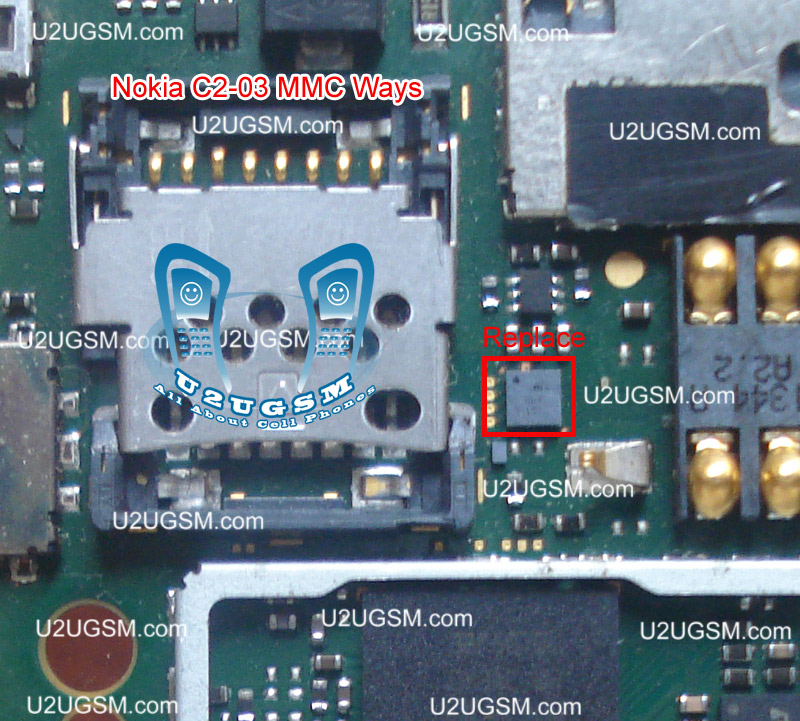
Nokia C2-03 MMC Memory Card Problem Solution Ways

Nokia C2-03 MMC is not working or it do not accept memory card it can be cause of water damage and rust. It can be due to MMC jack and damage pins. And this problem can be reason of MMC I.C So lets check all these parts and try to Repair Memory card Problem in Nokia C2-03.Nokia 5230 mic not working problem solution jumper ways
Nokia C2-03 MMC Memory Card Problem Solution Ways

The above diagram have a red line to show you which parts are used in Memory Card function so check these parts and in first step try to clean them with electronics cleaner and apply some hot air to dry it.
Once it is dry check and if not working then replace this I.C to solve memory card problem in Nokia C2-03.
for more detail and new tips and tricks about cellphone service problem keep visiting this page we will update cellphone service diagrams timely with new cellphone diagrams.some related post are also given bellow you can read them also for more information about cellphone.
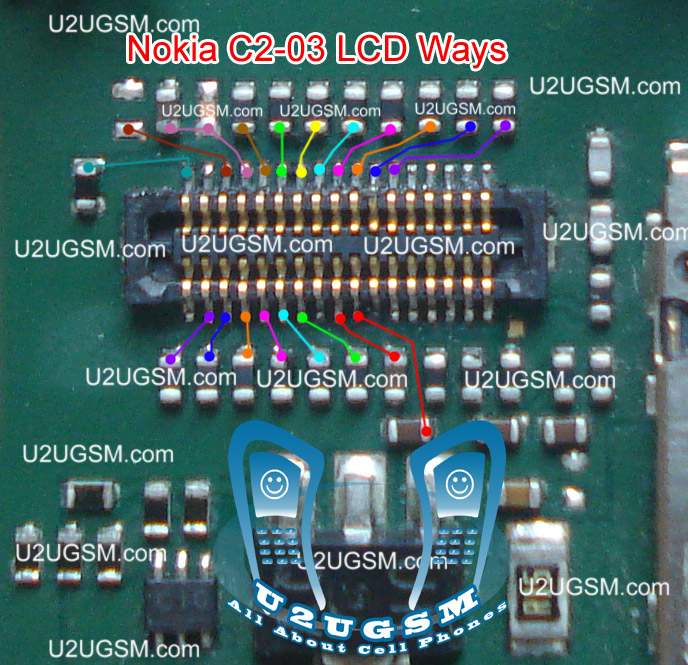
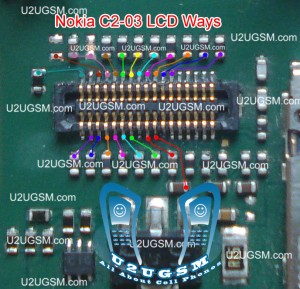
Nokia C2-03 Lcd Display Problem Solution Ways Jumpers

Nokia C2-03 Blank Lcd Display, Nokia C2-03 White Lcd Display, Nokia C2-03 Lcd Jack Damage Prints Missing.Nokia 5230 Not Charging solution no response problem solution
To solve lcd display problem in Nokia C2-03 we have required a few tools and components.
Nokia screw Driver t5 and t4 for opening screw .
Lcd panel for Nokia C2-03
Electronics Cleaner for rust or water damage.
Hot air to dry the mother board.
Lcd Jack if we have to replace it.
Nokia C2-03 Lcd Display Problem Solution Ways Jumpers

Diagnosting & Solution:
After disassemble of Nokia C2-03 remove lcd and check lcd jack and its near by area for rust or water damages.
If here is some carbon on parts or at lcd jack.
Apply electronics cleaner and dry it with hot air for a few mint.
Do not apply so much heat it can harm your skin and mother board parts also.
Check with Lcd and if it is still blank replace with new one.
It might be possible that lcd jack pins are missing or not getting connected with lcd so change it.
Check all these links as given in above diagram in different colors so that you can find them easily.
Warnings:
Do not apply to much heat it can damage the mother board.
Make sure mother board is dry proper when you apply electronics clean.
Check Lcd jack and when removing it make sure solder has been melt.
If solder has not proper melt and you try to remove lcd jack prints might be damage.
When you replace lcd make sure lcd strip is proper fixed.
It can be damage when you assemble the phone if not in proper place.
for more detail and new tips and tricks about cellphone service problem keep visiting this page we will update cellphone service diagrams timely with new cellphone diagrams.some related post are also given bellow you can read them also for more information about cellphone.
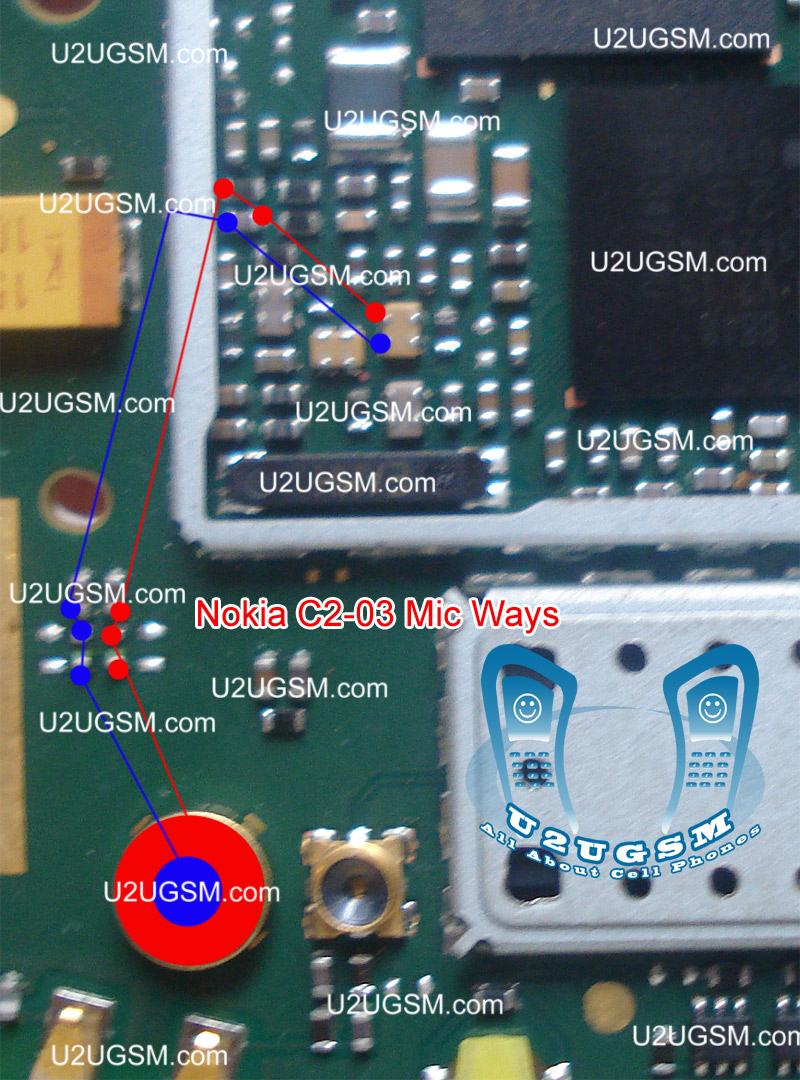
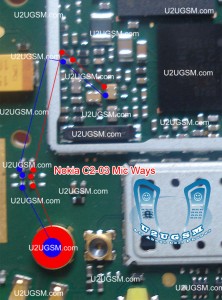
Nokia C2-03 Mic Problem Solution Jumper Ways Microphon

Nokia C2-03 Mic Problem Solution Jumper Ways MicrophonNokia C2-03 Mic not working, Microphone is not working in Nokia C2-03, Voice is missing and can not reach to destination Mobile Phone, Mic problem, Microphone Solution in Nokia C2-03 Nokia 5230 power switch button ways solution power key not working
Tools:-
Nokia T5 and T4 for disassemble.
Universal Microphone.
Electronics Cleaner.
Hot Air.
Electronics Meter.
Solding iron.
Diagnostics & Solutions:-
Before Disassemble of Nokia C2-03 make sure that mic whole in Cassing ( housing ) is opened. And here is not any dust in it. Disassemble the mobile phone and remove mic microphone from mother board with solding iron.
Check points on mother board with miter and if any value is missing check all these parts that are given in red and blue color in above diagram.If any of them is missing apply jumpers as described in above repairing picture.
Replace new mic and apply jumpers to its negative and positive points. On the mother board Red color line shows ground print and Blue line indicates positive print of mic. So this will help you to solve mic problem in nokia C2-03
Warnings:-
Apply solder on mic and Remove mic when it too hot so that mic print remain OK.
Don’t apply much heat with hot air it can damage the mother board.
Assemble with focus because if mic is not in its proper place voice will not reach to destination mobile. Or you will not be able to record voice in it.
for more detail and new tips and tricks about cellphone service problem keep visiting this page we will update cellphone service diagrams timely with new cellphone diagrams.some related post are also given bellow you can read them also for more information about cellphone.
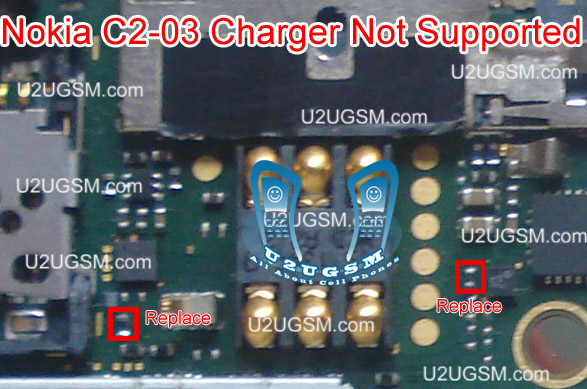
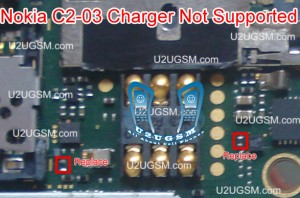
Nokia C2-03 Charger Not Supported Problem Solution Ways

Plug in Charging pin into charging jack of Nokia C2-03 and if it shows an indication message Charger Not Supported it can be due to these few parts that are given bellow in diagram.So after disassemble of Nokia C2-03 clean these parts and area with electronics cleaner.Nokia 5233 mic not working problem solution jumper ways
Noki C2-03 Charger Not Supported Problem Solution Ways
Apply hot air and make it dry.Resold these parts indicated with red lines in above diagram to solve Charger Not Supported in Nokia C2-03
You can take these parts from other models of nokia also to solve charging problem in nokia C2-03
for more detail and new tips and tricks about cellphone service problem keep visiting this page we will update cellphone service diagrams timely with new cellphone diagrams.some related post are also given bellow you can read them also for more information about cellphone.
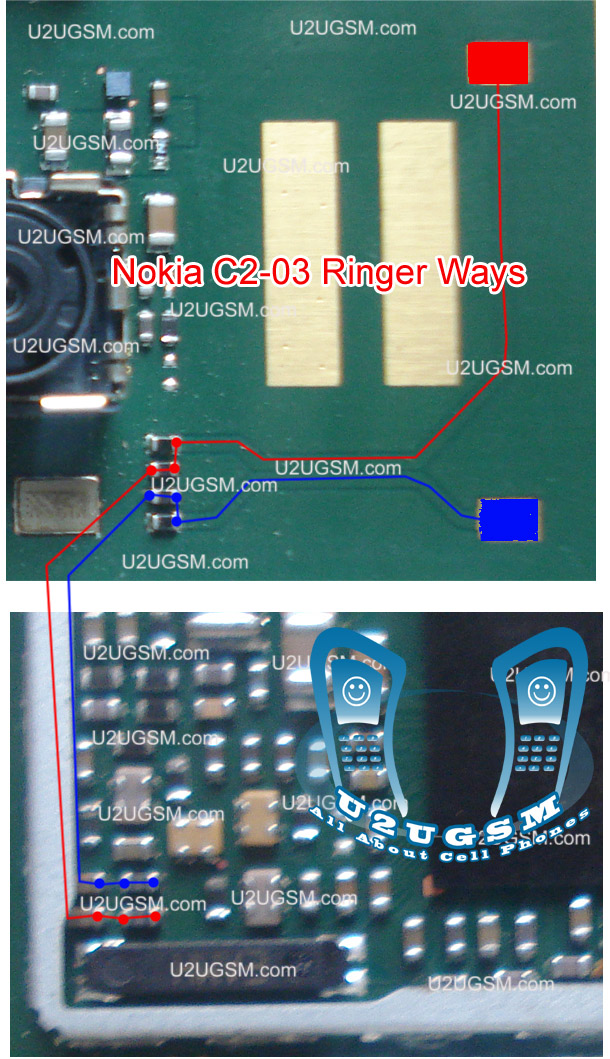
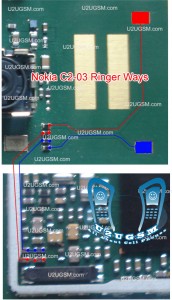
nokia C2-03 Ringer Problem Solution Jumper Ways

Nokia C2-03 ringer HF is not working, Nokia C2-03 Ringer Speaker is not working, Nokia C2-03 can not play music. We can not here voice during loud speaker in nokia c2-03.
Tools:-
Nokia key T4 and T5
Hot air.
Solding Iron.
Electronics Cleaner.
Nokia C2-03 Ringer, Nokia 5230 send key end key menu key not working jumper solution Nokia C2-03 Ringer Problem Solution Jumper Ways
Diagnostic & Solutions:-
If Nokia C2-03 is not abble to ring a bell and we can not use loud speaker it might be fault of ringer or it may not be attached with mother board.
it can be damage or might be its not in proper location.It can be cause of Water damages and missing components,So lets solve the problem in a few simple steps as given in above diagram.
Disassemble Nokia C2-03 and check ringer points with electronics meter.If ringer shows good value then check point on the mother board and if the have also a good value it can be cause of miss fitting.
So assembly with proper placements and tight the screw and try it if not working then replace ringer with new one.If you find some prints missing then apply jumpers as given in above diagram. There are two different color lines Red and Blue.These lines indicates the negative and positive prints of ringer in Nokia C2-03 so apply these jumper to solve ringer problem in nokia C2-03
Warnings:-
Do not apply much heat with hot air it can damage the mother board and your skin.
Keep in mind about placement of ringer because it is not proper ringer will not work.
for more detail and new tips and tricks about cellphone service problem keep visiting this page we will update cellphone service diagrams timely with new cellphone diagrams.some related post are also given bellow you can read them also for more information about cellphone.
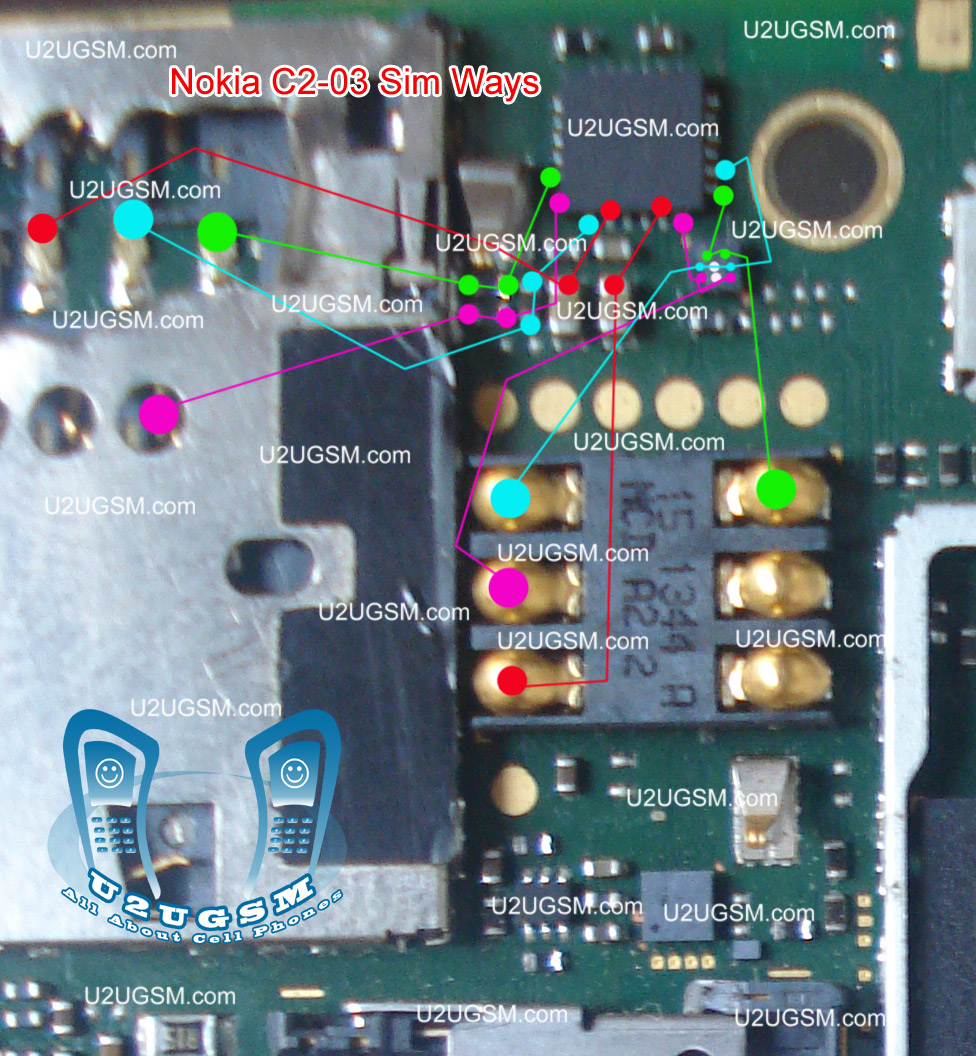
Nokia C2-03 Insert sim ways problem solution jumper

Nokia C2-03 insert sim problem, Sim is not working in Nokia C2-03, Sim is not Valid, Single Sim is not working in Nokia C2-03 Nokia 5800 volume up down not working solution
Nokia T4 and T5 key, Electronic meter, Electronics Cleaner, Hot Air, Solding Iron, Jumper Wire.
Nokia C2-03 Insert sim ways problem solution jumpers
Diagnostic and Solutions.
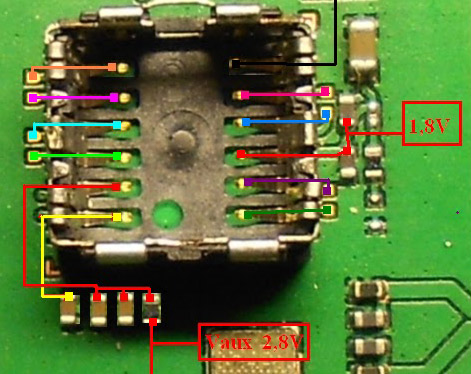
if sim is not working in Nokia C2-03 is can be cause of water damage or missing components. Use different sim and if sim is not working then de assemble Nokia C2-03.
Once Mobile phone is disassemble check all these parts that are given in above diagram and apply electronics cleaner. Apply hot air so that it can be dry but not to much because it can damage the mother board or may can harm your skin.
these different color lines are indicating different path and tracks that are used in sim function in Nokia C2-03 so if nay of them is missing apply that jumper as shown in diagram to solve insert sim problem in Nokia C2-03
If single sim is not working out of these two you can only jumper those parts that are used by it. And to find prints and track you can see above diagram.
Warnings:
Do not apply to much heat it can damage the mother board and harm your skin.
When apply jumpers make sure the do not be ground with other prints.It can short the mobile phone.
Remove Sim Ic with hot air because with Solding iron it might can damage prints also.
for more detail and new tips and tricks about cellphone service problem keep visiting this page we will update cellphone service diagrams timely with new cellphone diagrams.some related post are also given bellow you can read them also for more information about cellphone.

nokia c2-03 charging problem solution

nokia c2-03 charging solution , nokia c2-03 charging problem solution jumper , nokia c2-03 charging problem , nokia c2-03 charging problem solution , c2 03 charging problam salution.com, nokia c2 03 charging is not working, nokia c2-03 charging ways, nokia c2-03 charging no response , Nokia C2-03 charging problem gsm.com, nokia c2 03 charging solution, c20 03 nokia charging problam, nokia c203 charger not supported, Nokia c2 03 chargin no Respons problam salution .com, c2 03 charging no Response problem solution .com,nokia asha 202 charging problem jumper solution
nokia c2-03 charging problem solution
nokia c203 charging problem, Nokia C2 03 Charging problam.com, nokia c203 cherging solushans, nokia c2-03 charging prolem, Nokia c2 03 charging slution, nokia c2-03 charg solution, nokia c2 03 chaging not responding, c2 03 charging solution forum.shaarpmind.com, nokia c2-03 charging problam repair, nokia c2-03 charing solution, nokia c2-03 charger not detected

nokia c2-03 not charging solution here

nokia c2-03 charging ways, nokia c2-03 not charging, c2 00 nokia charger not supported problem, nokia c2-03 charging no show , haw to repair charge not supported nokia c2, nokia c2-03 charging problem solution, nokiac2notcharging, nokia c2-03 dead problem, nokia c2-03 charging show but battery not stor, c2-03 charger not supported, nokia c2-03 charging, nokia c200 charger pin image,Nokia 2330 Classic Hang problem solution
nokia c2-03 not charging solution
nokia c2-03 charging no response , c2 no charge , nokia c2-03 carging jampar solution , nokia C2 00 chargin problam solution , Nokia c2 00 charging problam, how to repair nokia charger pin, Nokia c200 charging problem, nokia c2-03 no on,

Nokia C2-03 Camera Standby Notworkin Problem Solution Jumper Ways

Nokia C2-03 Camera Problem, Nokia C2-03 Camera Standby Mode can be cause of water damage or breakage. To solve this problem in the mobile phone you can follow a few steps that i am going to describe in this post.
Nokia X2-02 Mic is Not Working Problem Solution Jumper Ways
Nokia C2-03 Camera Standby Not working Problem Solution Jumper Ways
In first step restore factory setting in Nokia C2-03. Then make a full flash (software firmware) installation. And the third step is to check hardware diagnostings. After dis assambly of phone check the whole mother board carefully.If there is some rust or carbon on board then clean it with electronics cleaner and apply some heat with hot air. So that the mother board can be dry.
If mother board can not be full dry it can create carbon in future so keep in mind it should be dry.Do not apply much heat as it can harm your skin and mother board of cell phone.
In above diagram as you can see there are different color lines. These lines are indicating tracks that are used in camera function so check these paths and apply jumpers as shown in above diagram.
for more detail and new tips and tricks about cellphone service problem keep visiting this page we will update cellphone service diagrams timely with new cellphone diagrams.some related post are also given bellow you can read them also for more information about cellphone.

Nokia C2-03 Not Charging Problem jumpers Ways Solution

1-Nokia C2-03 not charging problem.
2-Nokia C2-03 Do not show charging.
Tools:-
1-Hot Air is required.
2-Solding iron is required.
3-Skrue driver keys.
4-Electronics cleaner.
5-charging base if old one is damage.
6-old board of Nokia C2-03 if a few parts are damage in this board.So that they can be replaced.
7- Charger to diagnostic it.
Nokia X2-02 Ringer Problem Solution Ways Jumpers
Nokia C2-03 Not Charging Problem jumpers Ways Solutions
Solution:-
1-Plugin charging pin in charging jack and check.
2-if charging symbol is not appearing in display it can be fault of missing track pr charging jack.
3-change battery and check again.
4-if Not charging symbol appear on display it can be fault of r22 or 24k resistance.
5-Disassamble Nokia C2-03 and look at whole mother board carefully for rust or carbon.
6-Clean carbon area and the area shown in above diagram with electronics cleaner.
7-Apply heat with hot air so that it can be totally dry.
8-Do not apply to much heat it can be harm for your skin and mobile as well.
9-chek all these tracks as shown in the above diagram and if any path is missing apply jumpers.
10-if parts are missing or damage replace them.
Warnings:
Do not apply much heat it can be harm for your skin and mobile phone.
Try that board get fully dry.
At time of assembling keep in mind about fitting. If fitting is not proper charging jack will not attach and it will not show charging and will not start charging.
for more detail and new tips and tricks about cellphone service problem keep visiting this page we will update cellphone service diagrams timely with new cellphone diagrams.some related post are also given bellow you can read them also for more information about cellphone.

Nokia C2-03 Voluem Up Down Keys Not Working Problem Solution Jumpers

1-Nokia C2-03 Volume Up Key is Not Working.
2-Nokia C2-03 Volume Down Key is Not Working.
Tools:-
1-Hot Air is required.
2-Solding iron is required.
3-Skrue driver keys.
4-Electronics cleaner.
5-Four leg On of Switch ( Volume Key Switch ).
6-old board of Nokia C2-03 if a few parts are damage in this board.So that they can be replaced.Nokia X2-02 Speaker Ear Peace Problem Solution Jumper Ways

Nokia C2-03 Volume Up Down Keys Not Working Problem Solution Jumpers
Solution:-
If Volume Up or Down key is not working in Nokia C2-03 then it can be the cause of Volume Switch or Resistance near by it.
So disassemble mobile phone and check whole mother board.
If there is some rust or carbon clean it with electronics cleaner and apply some heat so that it can be dry.
Check these tracks as shown in red and green lines in above diagram.
If some prints are missing or a few parts are damage apply jumpers or replace damaged parts.
If Volume Switch is damage or broken then replace it with new one.
Warnings:
Do not apply much heat it can be harm for your skin and mobile phone.
Try that board get fully dry.
When you are removing old volume switch make sure you will not damage prints from mother board so remove it when solding iron is too much hot.Or remove it with hot air.

Nokia C2-03 Full PCB Diagram Mother Board Layout

Nokia C2-03 Full PCB cellphone Diagram Mother Board Layout.
Here is the cellphone diagram of Nokia C2-03 PCB.so i will add some more cellphone diagram in high resolution so that you can add some more repairing trick for

Nokia X2-02 Keypad is Not Working or Hang Problem Solution


Nokia C2-03 Full PCB Diagram Mother Board Layout-m

High Resolution

Nokia X2-02 Keypad is Not Working or Hang Problem Solution

Nokia C2-03 if you find some new repairing techniques please must email me and i will post that diagram with your reference in this way we all make it possible “REPAIRING MADE EASY” the basic point of www.u2ugsm.com
Thanks
for more detail and new tips and tricks about cellphone service problem keep visiting this page we will update cellphone service diagrams timely with new cellphone diagrams.some related post are also given bellow you can read them also for more information about cellphone.

Nokia C2-03 MMC Memory Card Problem Solution Ways

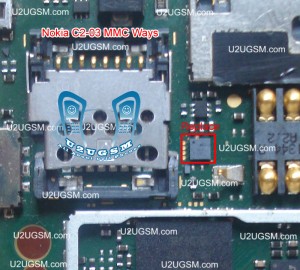
Nokia C2-03 MMC is not working or it do not accept memory card it can be cause of water damage and rust. It can be due to MMC jack and damage pins. And this problem can be reason of MMC I.C So lets check all these parts and try to Repair Memory card Problem in Nokia C2-03.
Nokia X2-02 lcd display ways jumpers problem solution white or blank.
Nokia C2-03 MMC Memory Card Problem Solution Ways

The above diagram have a red line to show you which parts are used in Memory Card function so check these parts and in first step try to clean them with electronics cleaner and apply some hot air to dry it.
Once it is dry check and if not working then replace this I.C to solve memory card problem in Nokia C2-03.
for more detail and new tips and tricks about cellphone service problem keep visiting this page we will update cellphone service diagrams timely with new cellphone diagrams.some related post are also given bellow you can read them also for more information about cellphone.
Nokia C2-03 Lcd Display Problem Solution Ways Jumpers

Nokia C2-03 Blank Lcd Display, Nokia C2-03 White Lcd Display, Nokia C2-03 Lcd Jack Damage Prints Missing.
Tools:-
To solve lcd display problem in Nokia C2-03 we have required a few tools and components.
Nokia screw Driver t5 and t4 for opening screw .
Lcd panel for Nokia C2-03
Electronics Cleaner for rust or water damage.
Hot air to dry the mother board.
Lcd Jack if we have to replace it.
Nokia x3 keypad light ok Lcd light not working Problem Solution Tested
Nokia C2-03 Lcd Display Problem Solution Ways Jumpers

Diagnosting & Solution:
After disassemble of Nokia C2-03 remove lcd and check lcd jack and its near by area for rust or water damages.
If here is some carbon on parts or at lcd jack.
Apply electronics cleaner and dry it with hot air for a few mint.
Do not apply so much heat it can harm your skin and mother board parts also.
Check with Lcd and if it is still blank replace with new one.
It might be possible that lcd jack pins are missing or not getting connected with lcd so change it.
Check all these links as given in above diagram in different colors so that you can find them easily.
Warnings:
Do not apply to much heat it can damage the mother board.
Make sure mother board is dry proper when you apply electronics clean.
Check Lcd jack and when removing it make sure solder has been melt.
If solder has not proper melt and you try to remove lcd jack prints might be damage.
When you replace lcd make sure lcd strip is proper fixed.
It can be damage when you assemble the phone if not in proper place.
for more detail and new tips and tricks about cellphone service problem keep visiting this page we will update cellphone service diagrams timely with new cellphone diagrams.some related post are also given bellow you can read them also for more information about cellphone.
Nokia C2-03 Mic Problem Solution Jumper Ways Microphon 100% tested

Nokia C2-03 Mic not working, Microphone is not working in Nokia C2-03, Voice is missing and can not reach to destination Mobile Phone, Mic problem, Microphone Solution in Nokia C2-03
Nokia C2-06 Ringer Problem Solution Jumper Ways
Nokia C2-03 Mic Problem Solution Jumper Ways Microphon
Tools:-
Nokia T5 and T4 for disassemble.
Universal Microphone.
Electronics Cleaner.
Hot Air.
Electronics Meter.
Solding iron.
Diagnostics & Solutions:-
Before Disassemble of Nokia C2-03 make sure that mic whole in Cassing ( housing ) is opened. And here is not any dust in it. Disassemble the mobile phone and remove mic microphone from mother board with solding iron.
Check points on mother board with miter and if any value is missing check all these parts that are given in red and blue color in above diagram.If any of them is missing apply jumpers as described in above repairing picture.
Replace new mic and apply jumpers to its negative and positive points. On the mother board Red color line shows ground print and Blue line indicates positive print of mic. So this will help you to solve mic problem in nokia C2-03
Warnings:-
Apply solder on mic and Remove mic when it too hot so that mic print remain OK.
Don’t apply much heat with hot air it can damage the mother board.
Assemble with focus because if mic is not in its proper place voice will not reach to destination mobile. Or you will not be able to record voice in it.
for more detail and new tips and tricks about cellphone service problem keep visiting this page we will update cellphone service diagrams timely with new cellphone diagrams.some related post are also given bellow you can read them also for more information about cellphone.
Nokia C2-03 Charger Not Supported Problem Solution Ways

Plug in Charging pin into charging jack of Nokia C2-03 and if it shows an indication message Charger Not Supported it can be due to these few parts that are given bellow in diagram.So after disassemble of Nokia C2-03 clean these parts and area with electronics cleaner.nokia 101 insert sim problem jumper solution
Noki C2-03 Charger Not Supported Problem Solution Ways
Apply hot air and make it dry.Resold these parts indicated with red lines in above diagram to solve Charger Not Supported in Nokia C2-03
You can take these parts from other models of nokia also to solve charging problem in nokia C2-03
for more detail and new tips and tricks about cellphone service problem keep visiting this page we will update cellphone service diagrams timely with new cellphone diagrams.some related post are also given bellow you can read them also for more information about cellphone.
nokia C2-03 Ringer Problem Solution Jumper Ways

Nokia C2-03 ringer HF is not working, Nokia C2-03 Ringer Speaker is not working, Nokia C2-03 can not play music. We can not here voice during loud speaker in nokia c2-03.
Tools:-
Nokia key T4 and T5
Hot air.
Solding Iron.
Electronics Cleaner.
Nokia C2-03 Ringer,Nokia 2323 Classic Insert sim problem solution ways jumper
Nokia C2-03 Ringer Problem Solution Jumper Ways
Diagnostic & Solutions:-
If Nokia C2-03 is not abble to ring a bell and we can not use loud speaker it might be fault of ringer or it may not be attached with mother board.
it can be damage or might be its not in proper location.It can be cause of Water damages and missing components,So lets solve the problem in a few simple steps as given in above diagram.
Disassemble Nokia C2-03 and check ringer points with electronics meter.If ringer shows good value then check point on the mother board and if the have also a good value it can be cause of miss fitting.
So assembly with proper placements and tight the screw and try it if not working then replace ringer with new one.If you find some prints missing then apply jumpers as given in above diagram. There are two different color lines Red and Blue.These lines indicates the negative and positive prints of ringer in Nokia C2-03 so apply these jumper to solve ringer problem in nokia C2-03
Warnings:-
Do not apply much heat with hot air it can damage the mother board and your skin.
Keep in mind about placement of ringer because it is not proper ringer will not work.
for more detail and new tips and tricks about cellphone service problem keep visiting this page we will update cellphone service diagrams timely with new cellphone diagrams.some related post are also given bellow you can read them also for more information about cellphone.
Related Posts Plugin for WordPress, Blogger...

All Gsm Solution Headline Animator

Blogger Tips and TricksLatest Tips And TricksBlogger Tricks

Please Log in