Showing posts with label Nokia C1-01. Show all posts

Nokia C1-01 Light Jumper Ways Solution

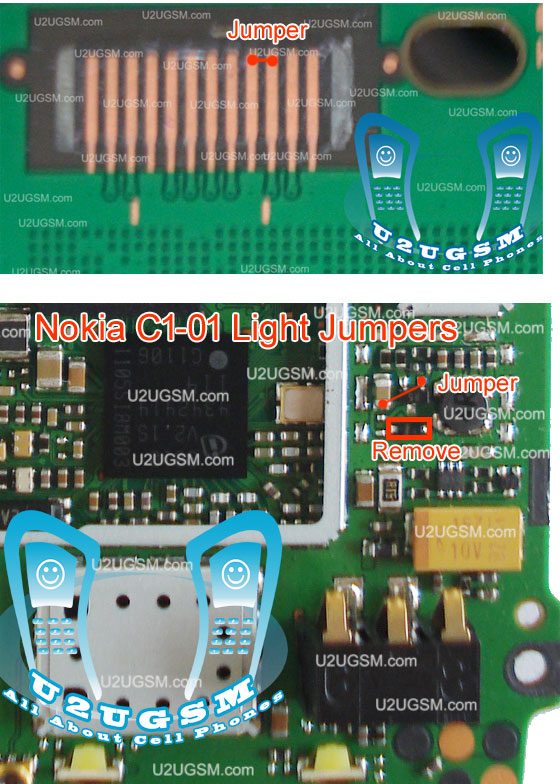
Here's solution for Nokia C1-01 in troubleshooting or repairing back light failure for both LCD and keypad white LED's. The solution below shows the connection tracks of the Nokia C1-01 light circuit connection. Just analyze how the connection flows and then you may get some hints where to start in troubleshooting.

Here's some hints on how to fix Nokia C1-01 light failure problem:

1) Check the connection between the inductor coil and the VBAT 3.7V line paths.
     If this is open or cut, the LED light is lack of power supply to it. 
2) Check the inductor coil for possible damaged, this holds the current stability of the LED light replace if
    necessary.
3) Check all the connection between the Keypad white LED light and the LCD light connection from in
   between the component where it is being connected.
4. If all the connection were okay, check the transistor and diode. Replace if necessary.
5) If all above the above mention seem already been taken but seems the problem still exists. Check the LCD white light bulb LED. (there also a possibility that the LCDs backlight is damaged)


Nokia C1-01 Light Jumper Ways Tracks

Nokia C1-01 LCD Screen Display Problem Jumper Ways Solution

 Nokia C1-01 LCD Screen Display Problem Jumper Ways & Tracks
This is the Nokia C1-01 Solution for an abnormal display problem, such as blank or empty screen, garbled or dark screen  display. This solution may works if you already tried installing a new LCD screen module and tried updating the device firmware but still the screen went wrong.

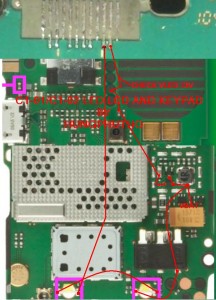
Refer to the solution below and do trace the LCD soldered pads connector down to the corresponding components such as the resistors and filter coils. The resistors has as resistance value of 22o ohms each. The VAUX is 2.8 volts and the VIO is 1.8 volts, you may also check these voltages.
This also includes the connection line paths of the LCD backlight LED, to fix if the white LED at the back of the LCD doesn't turns ON and shows a dark display.


Nokia C1-01 microSD Memory Card MMC not detected solution

This solution below can be used to fix Nokia C1-01 microSD memory card not detected problem issues, this problem may possibly occurred if the device suffered wet or water damaged. If this happens the Nokia C1-01 will not been able to detect any microSD memory card that inserted to it and it shows on the display the "NO memory card is inserted or memory card not detected".

The solution below below shows the location of certain component that needs to be check or replace to solve nokia C1-01 memory card not detected issues.


Nokia C1-01 microSD Memory Card Not detected
nokia C1 MMC IC jumper ways
The Nokia C1-01 MMC IC is located and mounted just besides the microSD slot. By replacing the MMC IC will possibly fix a damaged Nokia C1-01 that does not accept or read any microSD memory card.

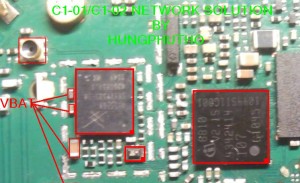
Nokia C1-01 network problem solution jumper ways

Nokia C1-01 no signal, Nokia C1-01 not network, Nokia C1-01 low signal problem can be solve with these few steps that I am going to post in this post. So keep reading and look at the diagram bellow for network solution in Nokia C1-01.Nokia Asha 300 Keypad Not Working Problem Solution Jumpers
Nokia C1-01 network problem solution jumper ways
To solve signal problem in Nokia C1-01 look at diagram above and in it you can find some parts that are identified with red lines, Clean these parts with electronics cleaner and apply some heat so that they can be dry.
Do nto apply much heat because it can harm your skin and may can damage the motherboard of Nokia C1-01.
Check antina points also in the housing (casing) and also apply jumper to short antina that is used for external antina attachment in Nokia C1-01.
for more detail and new tips and tricks about cellphone service problem keep visiting this page we will update cellphone service diagrams timely with new cellphone diagrams.some related post are also given bellow you can read them also for more information about cellphone.

Nokia C1-01 power button On Off switch not working ways jumpers

If Nokia C1-01 is not getting power On and it can make charging. It is 100% fault of on off button in it.because On Off button on keypad is not working so that it will not be able to power On.Nokia Asha 300 insert SIM Problem Solution ways jumpers
Nokia C1-01 power button On Off switch not working ways jumpers
Nokia C1-01 power button On Off switch not working ways jumpers.Replace battery and check if mobile can not be switch On dis assemble the phone and check power switch button ways as given in above diagram.If any print out of these is missing apply jumpers to solve On Off Button problem in Nokia C1-01 .
for more detail and new tips and tricks about cellphone service problem keep visiting this page we will update cellphone service diagrams timely with new cellphone diagrams.some related post are also given bellow you can read them also for more information about cellphone.

nokia c1-01 light problem solution jumpers Tested 100%

Light not working in Nokia C101 can be solve with this diagram that is given bellow. In this post you can find some parts that are used in Light function in Nokia C101.Nokia e52 100% tested fake charging solution
nokia c101 light problem solution jumpers Tested
All these parts are in lined with red color in first step remove parts that are given in nokia c101 light problem solution diagram above.And then short lcd point 3 and 4 as given in diagram above to repair light problem in nokia c1-01 with jumpers.
Apply second jumper from capestor to the three leg ic’s print. Where as it is given in diagram above to repair light solution jumpers.
Check Lights in some cases light led are not fixed proper. So re sold led lights and it will work ok.

Nokia C1-01 Insert sim problem solution jumper ways

If sim is not working in Nokia C1-01 and your are facing Inset sim problem in Nokia C1-01. Sim not valid or invalid sim problem in Nokia C1-01 all these sim problems can be solve by following these few steps that I am going to teach you in this post.
Nokia C1-01 Insert sim problem solution jumper ways
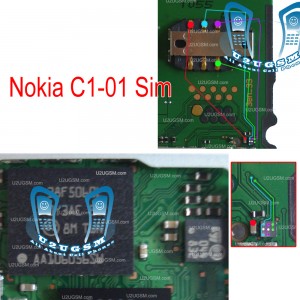
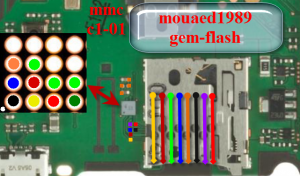
Check with new sim if replacement of sim shows the same error problem dis assemble the Nokia C1-01.After disassembly remove sim ic as shown in above diagram to solve insert sim problem in Nokia C1-01.
Once Sim Ic is remove check all these tracks with meter and short sim Ic by applying jumpers as given in above diagram in different colors. Each color is defining different sim tracks. If sim IC’s prints are damage you can scratch area near by sim that you can find in repairing diagram for insert sim solution in this post.
for more detail and new tips and tricks about cellphone service problem keep visiting this page we will update cellphone service diagrams timely with new cellphone diagrams.some related post are also given bellow you can read them also for more information about cellphone.

Nokia C1-01 Jumper solution for light problem

Nokia C1-01 Light ways and jumpers are given in this post and diagram bellow. Lcd or Keypad Led lights not working. If light is not lighting in Nokia C1-01 Light.
Nokia C1-01 Jumper solution for light problem
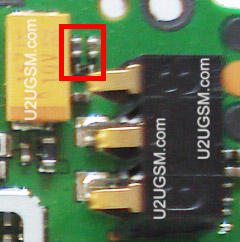
In above diagram you can see a pink color box so remove this three leg ic and then remove one led from mother board. Once three leg ic and led is removed from mother board you can apply jumpers as given in diagram above in red lines to solve light problem in Nokia C1-01.
for more detail and new tips and tricks about cellphone service problem keep visiting this page we will update cellphone service diagrams timely with new cellphone diagrams.some related post are also given bellow you can read them also for more information about cellphone.

Nokia C1-01 Light Problem Solution in 6 Steps Tested

If light is not lighting in Nokia C1-01 Light. Lcd or Keypad Led lights not working. Nokia C1-01 Light ways and jumpers are given in this post and diagram bellow.
Nokia C1-01 Light Problem Solution in 6 Steps Tested
Step1:
Check coil and three leg ic for light solution in Nokia C1-01.
Step2:
Check lcd points and paths given in green color.
Step3:
Check lcd points and path given in red lines.
Step4:
Check tracks of led lights as given in yellow colors.
Step5:
Chang coil that is helping Nokia C1-01 for light function.
Step6:
Change divot that is indicated in this repairing diagram for Nokia C1-01 light solution.
The above diagram and these 6 steps will help you to solve light problem solution in Nokia C1-01.
for more detail and new tips and tricks about cellphone service problem keep visiting this page we will update cellphone service diagrams timely with new cellphone diagrams.some related post are also given bellow you can read them also for more information about cellphone.

Memory Card problem solution for Nokia C1-01 MMC Jumper Ways

It will show some errors like mmc corrupted Format Memory card.
Memory card problem in Nokia C1-01 can be solve by following these tricks that i am posting in this post.
Memory Card problem solution for Nokia C1-01 MMC Jumper Ways
If Nokia C1-01 MMC Memory card is not working we can not save camera pictures videos and data. We can not play music and videos and applications.
Look at above diagram in this diagram you can see different color lines and mmc ic. Check all these tracks with meter and if any of them is missing apply jumpers as shown in above diagram.
Clean MMC ic with electronics clean and apply some heat so that it can be dry. Do not apply much heat because it can harm your skin and may can be damage the mother board.
If re solding can not solve MMC problem in Nokia C1-01 Replace the Ic.
for more detail and new tips and tricks about cellphone service problem keep visiting this page we will update cellphone service diagrams timely with new cellphone diagrams.some related post are also given bellow you can read them also for more information about cellphone.

Nokia C1-01 Not Charging Solution with Jumpers

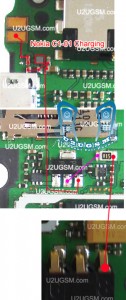
If you plug in charger and Nokia C1-01 shows not charging notification in it. It can be fault of charging ic or r22 resistance. While if it did not show any notification it may can be fault of missing components or It can be fault of Charging Base,
Nokia C1-01 Not Charging Solution with Jumpers
So In first step replace charger and if problem can not be solve with replacement of charger Dis assemble the mobile phone.
Change charging pin and try again if still charging problem remain same check all these tracks and parts that are given in above diagram. If any path or component is missing apply jumpers as identified in above repairing diagram for Nokia C1-01 not charging problem.
for more detail and new tips and tricks about cellphone service problem keep visiting this page we will update cellphone service diagrams timely with new cellphone diagrams.some related post are also given bellow you can read them also for more information about cellphone.

Nokia C1-01 Light Solution for LED Keypad and LCD

Nokia C1-01 light problem, Nokia C1-01 display light problem, Nokia C1-01 keypad light problem solution can be easily once you have read all this post. So keep reading and look at the diagram bellow to solve light problem in Nokia C1-01.
Nokia C1-01 Light Solution for LED Keypad and LCD
In above diagram you can see red lines that are defining paths and tracks of light function and its parts. So check all these parts and components with meter. IF any of them is missing or parts is damage apply jumpers and replace damage parts.
for more detail and new tips and tricks about cellphone service problem keep visiting this page we will update cellphone service diagrams timely with new cellphone diagrams.some related post are also given bellow you can read them also for more information about cellphone.

Nokia C1-01 Hand Free Open Problem Solution Jumper Ways

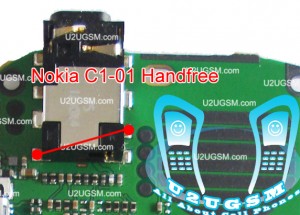
If you are facing hand free problem in Nokia C1-01 it can be solve with a few steps that I am going to post in this post. If hand free is open you will see a notification of hands fee in Nokia C1-01 while handfree is not plugged in.
Nokia C1-01 Hand Free Open Problem Solution Jumper Ways
To solve Nokia C1-01 Hendfree problem you can apply jumper as shown in above diagram and in above diagram you can find jumper in red line.
Once you apply jumper hand free problem will be solve. And if it cannot be solve with applying jumper you can replace hands free jack.
for more detail and new tips and tricks about cellphone service problem keep visiting this page we will update cellphone service diagrams timely with new cellphone diagrams.some related post are also given bellow you can read them also for more information about cellphone.

Nokia C1-01 speaker ear piece problem solution jumper ways

If speaker is not working in Nokia C1-01 we cannot hear voice of caller. We cannot make a call. In some cases speaker is ringing but with a noise or a low voice quality.
Nokia C1-01 speaker ear piece problem solution jumper ways
In all these cases this post will help you to solve speaker problem in Nokia C1-01. After dis assembly of Nokia C1-01 change speaker and check it if problem can not be solve with replacement of speaker you can see all these tracks that are given in above diagram to solve speaker problem in Nokia C1-01
This solution of speaker problem in Nokia C1-01 is possible with these tips and tricks. Check all these tracks with meter and if any of them is missing then you can apply jumpers as given in above diagram to repair the speaker .
for more detail and new tips and tricks about cellphone service problem keep visiting this page we will update cellphone service diagrams timely with new cellphone diagrams.some related post are also given bellow you can read them also for more information about cellphone.

Nokia C1-01 Local Mode Test mode problem solution

If you have Test mode Local mode problem in Nokia C1-01 you will not be able to operate anything in Nokia C1-01. It will show only Test mode or Local mode on screen and nothing else this.
Nokia C1-01 Local Mode Test mode problem solution
To solve Test Mode Local Mode problem in Nokia C1-01 look at above diagram. In above diagram parts are in lined with red line. Clean these parts with electronics cleaner and apply some heat with hot air. Do not apply much heat because it can harm your skin and also can damage the mother board.
If with above steps it cannot be solve resold or replace these parts. In some cases it can be solve with removing these parts also.
for more detail and new tips and tricks about cellphone service problem keep visiting this page we will update cellphone service diagrams timely with new cellphone diagrams.some related post are also given bellow you can read them also for more information about cellphone.

Nokia C1-01 network problem solution jumper ways

Nokia C1-01 no signal, Nokia C1-01 not network, Nokia C1-01 low signal problem can be solve with these few steps that I am going to post in this post. So keep reading and look at the diagram bellow for network solution in Nokia C1-01.
Nokia C1-01 network problem solution jumper ways
To solve signal problem in Nokia C1-01 look at diagram above and in it you can find some parts that are identified with red lines, Clean these parts with electronics cleaner and apply some heat so that they can be dry.
Do nto apply much heat because it can harm your skin and may can damage the motherboard of Nokia C1-01.
Check antina points also in the housing (casing) and also apply jumper to short antina that is used for external antina attachment in Nokia C1-01.
for more detail and new tips and tricks about cellphone service problem keep visiting this page we will update cellphone service diagrams timely with new cellphone diagrams.some related post are also given bellow you can read them also for more information about cellphone.

Nokia C1-01 no power full shorted done by remove capacitor!!!

History:

No power full shorted..


Action Taken:

1.Use RPS but no indications of hot parts..

2.I try to remove BIG capacitor in 1st try but no luck.

3.In 2nd BIG capacitor removing..BINGO i did it


4. try to test again if shorted remove..!!


DONE & TESTING:


Thanks....
Related Posts Plugin for WordPress, Blogger...

All Gsm Solution Headline Animator

Blogger Tips and TricksLatest Tips And TricksBlogger Tricks

Please Log in