Showing posts with label Nokia Asha 300. Show all posts

Nokia Asha 300 Mic Not Working Problem Solution Jumpers

If you are facing mic problem low voice or not voice out going to destination then this diagram will help you to solve mice problem in nokia asha 300. In diagram bellow you can see a mic that is defined with red boarder and some parts are also defined with red line boarder.All cellular mobile repair solution here Nokia C2-01 Hand Free Problem Solution Jumper Ways
So we have to check all these parts that are in red board to solve mic problem and mic not working problem in nokia asha 300.check mother board vary carefully if there is any rust carbon or water damage issue. Clean mother board form these areas and apply some heat with hot air so that mother board of nokia asha 300 can be dry.
If with only service it can not be solved change mic and you can remove mic with hot air or solding iron. In nokia asha 300 mic has 4 points itself and one is ground other are data clock points. so we can apply jumpers in these point.
for more detail and new tips and tricks about cellphone service problem keep visiting this page we will update cellphone service diagrams timely with new cellphone diagrams.some related post are also given bellow you can read them also for more information about cellphone.
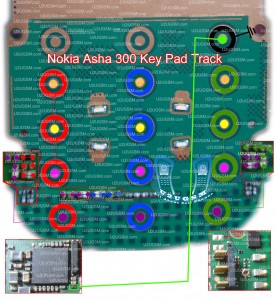
Nokia Asha 300 Keypad Not Working Problem Solution Jumpers

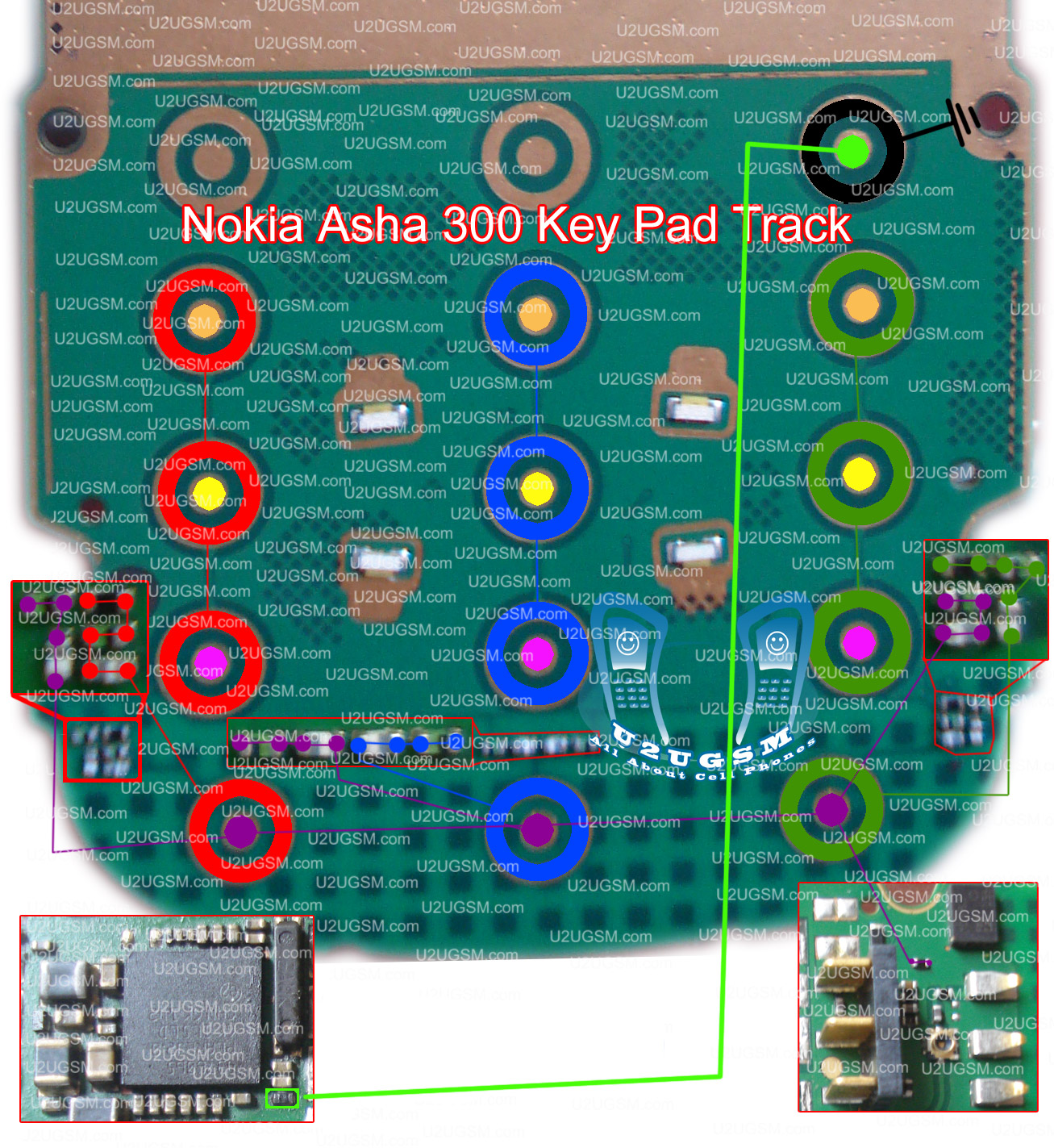
If any, all or a few keys not working in nokia asha 300 then this post will help you to solve all keypad not working problems easily and in a quick way. Simply look at diagram bellow and check all the track and links as shown in it.Nokia 2320 Classic Local Test Mode Problem Solution see All cellular mobile repair solution

Once you check with meter if any of them is broken make these jumpers and your problem will solve easily. All same color keys outer and inner are to define same link ways. If a single key is not working we can apply jumper form other key that have same color for outer or inner.
Some key are going to resistance and capacitors in diagram so we have to apply jumpers on those places and parts. In diagram above a few small diagrams have red border and these are zoom images of the board so that you can see parts vary clearly.
So zoom diagram are only to show close up of board. The diagram above also contain on off button ways in it.
for more detail and new tips and tricks about cellphone service problem keep visiting this page we will update cellphone service diagrams timely with new cellphone diagrams.some related post are also given bellow you can read them also for more information about cellphone.

Nokia Asha 300 Speaker Problem Solution jumpers

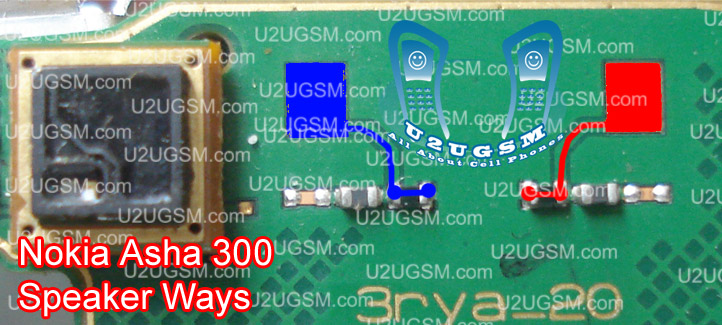
Nokia Asha 300 Speaker problem can be solve with a few steps that are given in diagram bellow so look at diagram bellow to solve love Speaker voice, no Speaker tones, no Speaker working problems in nokia asha 300.in diagram there are two colors blue and red both colors are defining path of circuit in mobile phone.Nokia Asha 311 Volume and Lock Keys Not working Jumpers see All cellular mobile repair solution

Check Speaker and if Speaker do not show continuity or a good value with meter then change Speaker with new one. Check points on board where Speaker have to attaché after put in casing housing.
Then check all these paths as shown in diagram above and if any of them is broken or missing components then apply jumpers as described above. Small circle shows positions where we are able to make jumpers. in these place we can apply jumpers to solve Speaker problem in nokia asha 300.
for more detail and new tips and tricks about cellphone service problem keep visiting this page we will update cellphone service diagrams timely with new cellphone diagrams.some related post are also given bellow you can read them also for more information about cellphone.
Nokia Asha 300 Ringer Problem Solution jumpers

Nokia Asha 300 ringer problem can be solve with a few steps that are given in diagram bellow so look at diagram bellow to solve love ringer voice, no ringer tones, no ringer working problems in nokia asha 300.in diagram there are two colors blue and red both colors are defining path of circuit in mobile phone.Nokia 2320 Classic Mic Problem Solution Jumper Ways see All cellular mobile repair solution

Check ringer and if ringer do not show continuity or a good value with meter then change ringer with new one. Check points on board where ringer have to attaché after put in casing housing.
Then check all these paths as shown in diagram above and if any of them is broken or missing components then apply jumpers as described above. Small circle shows positions where we are able to make jumpers. in these place we can apply jumpers to solve ringer problem in nokia asha 300.
for more detail and new tips and tricks about cellphone service problem keep visiting this page we will update cellphone service diagrams timely with new cellphone diagrams.some related post are also given bellow you can read them also for more information about cellphone.
Nokia Asha 300 Power button On Off Switch Ways Jumpers Dead Problem Solution

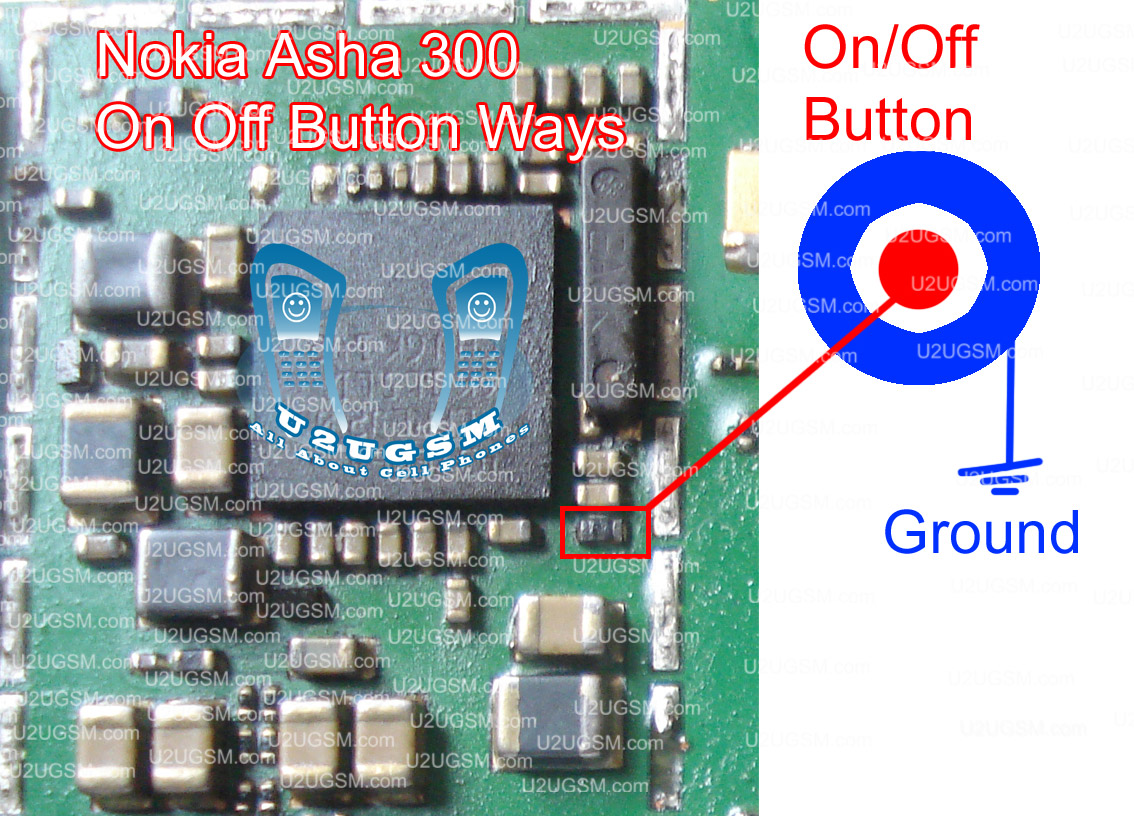
Some time nokia asha 300 can be dead due to on off button problem. If on off button is not working in nokia asha 300 then it can not power on. So to solve this problem we have to follow a few steps that are given bellow and have to follow diagram bellow also.All cellular mobile repair solution see Nokia C2-01 Bluetooth Fm Radio is Not Working Solution
Nokia Asha 300 Power button On Off Switch Ways Jumpers Dead Problem Solution To check that it is button fault we can make a simple test plug in charger and check is it working in off mode if you can see nokia asha 300 is charging ok in off mode then it means set is not totally dead. And problem is only that mobile can not become power on.
So remove key pad striker and check is there any rust carbon or water damage on off button if yes clean it and change the push of button. Check links with meter and if on off button does not show value outer is a ground you can apply jumper on any ground print. While inner is a positive print and going to resistance back of mother board. Apply jumper as shown in diagram in red color.
for more detail and new tips and tricks about cellphone service problem keep visiting this page we will update cellphone service diagrams timely with new cellphone diagrams.some related post are also given bellow you can read them also for more information about cellphone.

Nokia Asha 300 insert SIM Problem Solution ways jumpers

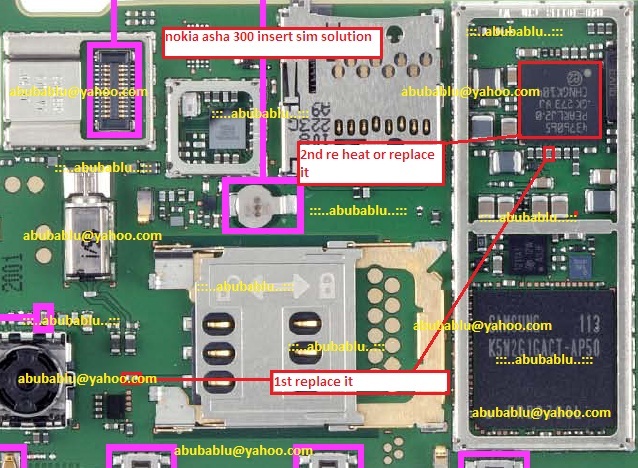
Here is the Nokia Asha 300solution for SIM card problems. You can first ensure that the problem exists on the device and not the SIM card, you only need a new prepaid SIM cards as the already damaged.Nokia E52 Keypad problem solution and IC Jumpers
Nokia Asha 300 insert SIM Problem Solution ways jumpers

if you are facing insert sim problem in Nokia Asha 300then this can be solved with a few jumpers as shown in diagram attached with this post.look at the diagram here a few different color lines that are defining path and links of sim points to the insert sim ic.at the left side of diagram you can see how we can jumper sim ic to solve insert sim problem in nokia 2720 fold.you can short ic points with each other by following color scheme as given in diagram.
for more detail and new tips and tricks about this problem keep visiting this page we will update it timely with new diagrams.some related post are also given bellow you can read them also for more information.

Nokia Asha 300 Charging Problem Solution Jumpers Ways

In nokia asha 300 if it is not charging ok and you have not charging problem in nokia asha 300 then you can solve this problem with help of diagram bellow. in this diagram all charging links are identified so that you can understand which parts are used in charging function in nokia asha 300.Nokia E52 keypad light solution problem jumper ways

So one print is ground it is identified in diagram with blue color and red cooler is a positive print and you can check all track with meter and if any of them is broken you can apply jumper as defined in repairing diagram.mostly if we plug in charger and it does not show any thing it can be fault of charging base or may be fault of broken link. so check charging base also.
If it shows not charging indication or a message charger not supported then it can be fault of charging ic or may be due to 47k resistance. About these problems I will post in upcoming days.
for more detail and new tips and tricks about cellphone service problem keep visiting this page we will update cellphone service diagrams timely with new cellphone diagrams.some related post are also given bellow you can read them also for more information about cellphone.

Nokia asha 300 charging not supported solution

nokia 300 charger not supported , nokia asha 300 charger not supported , nokia 300 charger not supported solutions , asha 300 not charging , Nokia asha 300 charging not supported solution , Nokia 200 charger not support solution , asha 300 charger not supported , nokia asha 300 charging not supported, nokia 300 repaire no carger, nokia asha 200 charging not supported solutions, nokia300 charging not sopoted, nokia 300 charger not suppoted solution, nokia asha 202 charging problem jumper solution
Nokia asha 300 charging not supported solution
n300 charging ways, nokia asha 300 charger not supported solution, asha 300 gharging not support, asha 300 charger not supported, nokia asha 200 charger not supported, nokia asha 300 support forum, gsm forum 300 charging problem, not supported nokia 300, nokia 301 charger not supported, how to solve nokia asha300 charger not support, nokia asha 300 charger not supported, nokia 300 charger not

Nokia Asha 300 Keypad Not Working Problem Solution Jumpers ways

If any, all or a few keys not working in nokia asha 300 then this post will help you to solve all keypad not working problems easily and in a quick way. Simply look at diagram bellow and check all the track and links as shown in it.

Once you check with meter if any of them is broken make these jumpers and your problem will solve easily. All same color keys outer and inner are to define same link ways. If a single key is not working we can apply jumper form other key that have same color for outer or inner.
Some key are going to resistance and capacitors in diagram so we have to apply jumpers on those places and parts. In diagram above a few small diagrams have red border and these are zoom images of the board so that you can see parts vary clearly.
So zoom diagram are only to show close up of board. The diagram above also contain on off button ways in it.
for more detail and new tips and tricks about cellphone service problem keep visiting this page we will update cellphone service diagrams timely with new cellphone diagrams.some related post are also given bellow you can read them also for more information about cellphone.
Nokia Asha 300 Ringer Problem Solution jumpers

Nokia Asha 300 ringer problem can be solve with a few steps that are given in diagram bellow so look at diagram bellow to solve love ringer voice, no ringer tones, no ringer working problems in nokia asha 300.in diagram there are two colors blue and red both colors are defining path of circuit in mobile phone.

Check ringer and if ringer do not show continuity or a good value with meter then change ringer with new one. Check points on board where ringer have to attaché after put in casing housing.
Then check all these paths as shown in diagram above and if any of them is broken or missing components then apply jumpers as described above. Small circle shows positions where we are able to make jumpers. in these place we can apply jumpers to solve ringer problem in nokia asha 300.
for more detail and new tips and tricks about cellphone service problem keep visiting this page we will update cellphone service diagrams timely with new cellphone diagrams.some related post are also given bellow you can read them also for more information about cellphone.

Nokia Asha 300 Power button On Off Switch Ways Jumpers Dead Problem Solution

Some time nokia asha 300 can be dead due to on off button problem. If on off button is not working in nokia asha 300 then it can not power on. So to solve this problem we have to follow a few steps that are given bellow and have to follow diagram bellow also.

Nokia Asha 300 Power button On Off Switch Ways Jumpers Dead Problem Solution To check that it is button fault we can make a simple test plug in charger and check is it working in off mode if you can see nokia asha 300 is charging ok in off mode then it means set is not totally dead. And problem is only that mobile can not become power on.
So remove key pad striker and check is there any rust carbon or water damage on off button if yes clean it and change the push of button. Check links with meter and if on off button does not show value outer is a ground you can apply jumper on any ground print. While inner is a positive print and going to resistance back of mother board. Apply jumper as shown in diagram in red color.
for more detail and new tips and tricks about cellphone service problem keep visiting this page we will update cellphone service diagrams timely with new cellphone diagrams.some related post are also given bellow you can read them also for more information about cellphone.

Nokia Asha 300 Speaker Problem Solution jumpers

Nokia Asha 300 Speaker problem can be solve with a few steps that are given in diagram bellow so look at diagram bellow to solve love Speaker voice, no Speaker tones, no Speaker working problems in nokia asha 300.in diagram there are two colors blue and red both colors are defining path of circuit in mobile phone.

Check Speaker and if Speaker do not show continuity or a good value with meter then change Speaker with new one. Check points on board where Speaker have to attaché after put in casing housing.
Then check all these paths as shown in diagram above and if any of them is broken or missing components then apply jumpers as described above. Small circle shows positions where we are able to make jumpers. in these place we can apply jumpers to solve Speaker problem in nokia asha 300.
for more detail and new tips and tricks about cellphone service problem keep visiting this page we will update cellphone service diagrams timely with new cellphone diagrams.some related post are also given bellow you can read them also for more information about cellphone.

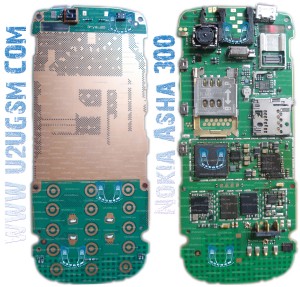
Nokia Asha 300 Full PCB Diagram Mother Board Layout.

Nokia Asha 300 Full PCB cellphone Diagram Mother Board Layout.
Here is the cellphone diagram of Nokia Asha 300 PCB.so i will add some more cellphone diagram in high resolution so that you can add some more repairing trick for

High Resolution

Download High Resolution Diagram of Nokia Asha 300 Nokia Asha 300 if you find some new repairing techniques please must email me and i will post that diagram with your reference in this way we all make it possible “REPAIRING MADE EASY” the basic point Thanks for more detail and new tips and tricks about cellphone service problem keep visiting this page we will update cellphone service diagrams timely with new cellphone diagrams.some related post are also given bellow you can read them also for more information about cellphone.
Nokia Asha 300 Keypad Not Working Problem Solution Jumpers

If any, all or a few keys not working in nokia asha 300 then this post will help you to solve all keypad not working problems easily and in a quick way. Simply look at diagram bellow and check all the track and links as shown in it.

Once you check with meter if any of them is broken make these jumpers and your problem will solve easily. All same color keys outer and inner are to define same link ways. If a single key is not working we can apply jumper form other key that have same color for outer or inner.
Some key are going to resistance and capacitors in diagram so we have to apply jumpers on those places and parts. In diagram above a few small diagrams have red border and these are zoom images of the board so that you can see parts vary clearly.
So zoom diagram are only to show close up of board. The diagram above also contain on off button ways in it.
for more detail and new tips and tricks about cellphone service problem keep visiting this page we will update cellphone service diagrams timely with new cellphone diagrams.some related post are also given bellow you can read them also for more information about cellphone.

Nokia Asha 300 Mic Not Working Problem Solution Jumpers

If you are facing mic problem low voice or not voice out going to destination then this diagram will help you to solve mice problem in nokia asha 300. In diagram bellow you can see a mic that is defined with red boarder and some parts are also defined with red line boarder.

So we have to check all these parts that are in red board to solve mic problem and mic not working problem in nokia asha 300.check mother board vary carefully if there is any rust carbon or water damage issue. Clean mother board form these areas and apply some heat with hot air so that mother board of nokia asha 300 can be dry.
If with only service it can not be solved change mic and you can remove mic with hot air or solding iron. In nokia asha 300 mic has 4 points itself and one is ground other are data clock points. so we can apply jumpers in these point.
for more detail and new tips and tricks about cellphone service problem keep visiting this page we will update cellphone service diagrams timely with new cellphone diagrams.some related post are also given bellow you can read them also for more information about cellphone.

Nokia Asha 300 RM-781 Urdu latest flash files Free download

Nokia Asha 300 RM-781 latest flash files Free direct download only 3 files mcu,ppm,cnt  just click on file for direct download.

Latest version 7.65. 
1) MCU 
2) PPM 
3) CNT

Related Posts Plugin for WordPress, Blogger...

All Gsm Solution Headline Animator

Blogger Tips and TricksLatest Tips And TricksBlogger Tricks

Please Log in
