Showing posts with label Nokia 101. Show all posts

nokia 101 insert sim 1 solution

if nokia 101 insert sim 1 is not working then it can be fault of missing tracks and path. Parts can be damage due to water damage and rust so after dis assemble of mobile phone make it clean with electronics cleaner and apply hot air to make it dry.Nokia C2-03 Camera Standby Notworkin Problem Solution Jumper Ways
nokia 101 insert sim 1 solution
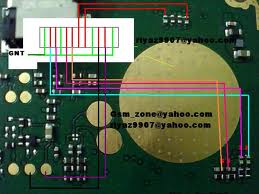
In above diagram you can see different color lines that are used in sim functions. Check these tracks with meter and if any of them is missing apply these jumpers to solve insert sim problem in nokia 101.

nokia 101 insert sim problem jumper solution

To solve nokia 101 insert sim problem jumper solution this post will help you very much. This diagram will teach you how simply and easily you can sol insert sim problem in nokia 101.Nokia Asha 311 Not Charging Problem Solution Jumper Ways
nokia 101 insert sim problem jumper solution
same as jumpers are given in above diagram you can apply on the mother board and you can solve insert sim problem in nokia 101 with a few jumpers.
all jumper point are given in different colors so tat you can identify them easlily.

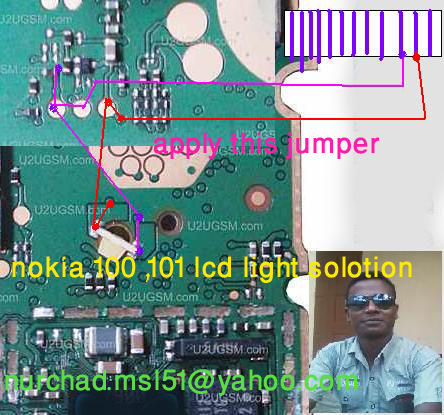
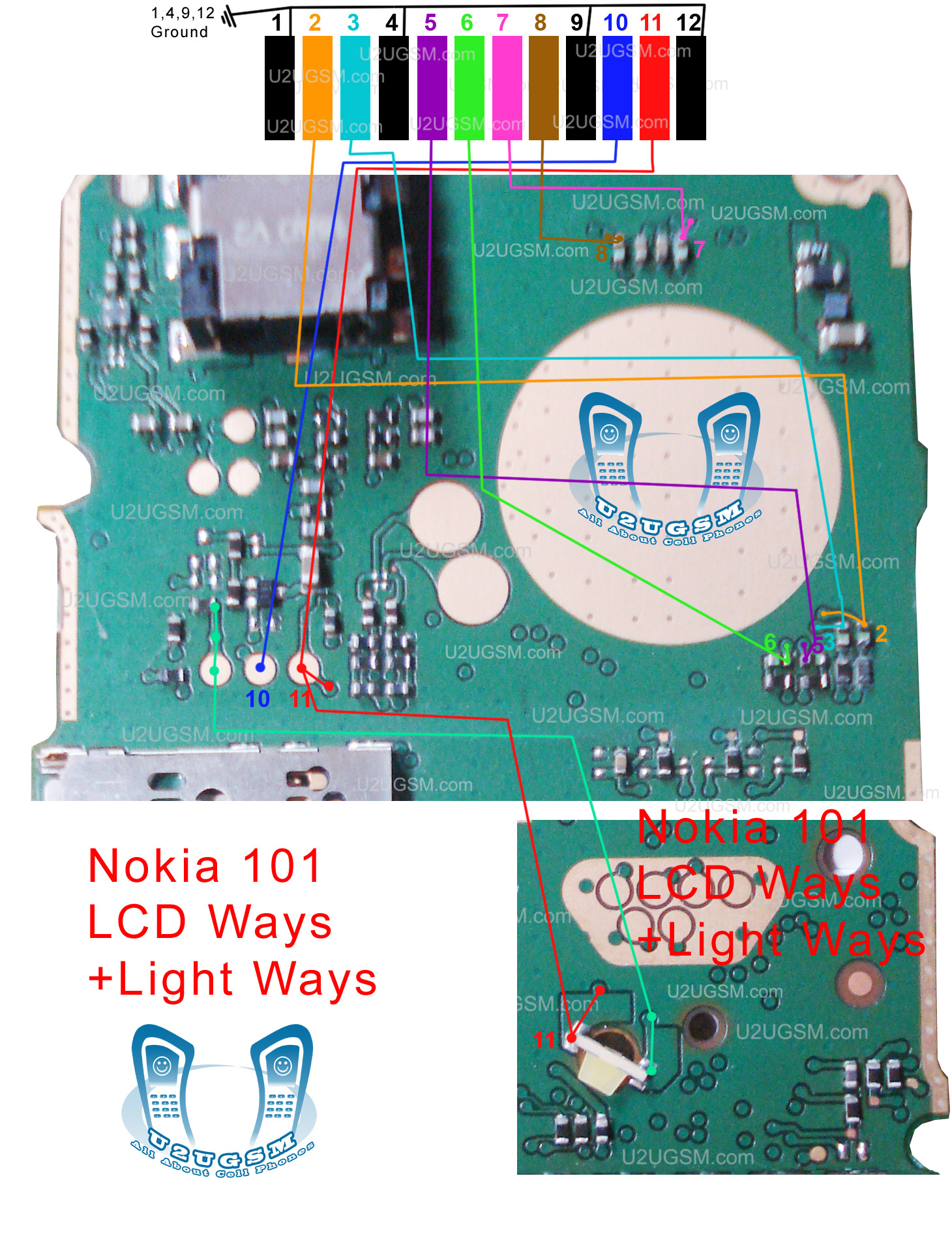
nokia 101 lcd light solution

Nokia 101 lcd light problem solution can be solve by applying these jumpers. Light problem in Nokia 101 can be cause of water damages.nokia 111 insert sim solution
nokia 101 lcd light solution
as you can find a few different color tracks you have to check these track with meter to solve nokia 101 lcd light problem solution. if any of them is missing apply these jumpers as given in above diagram to solve light problem in nokia 101.

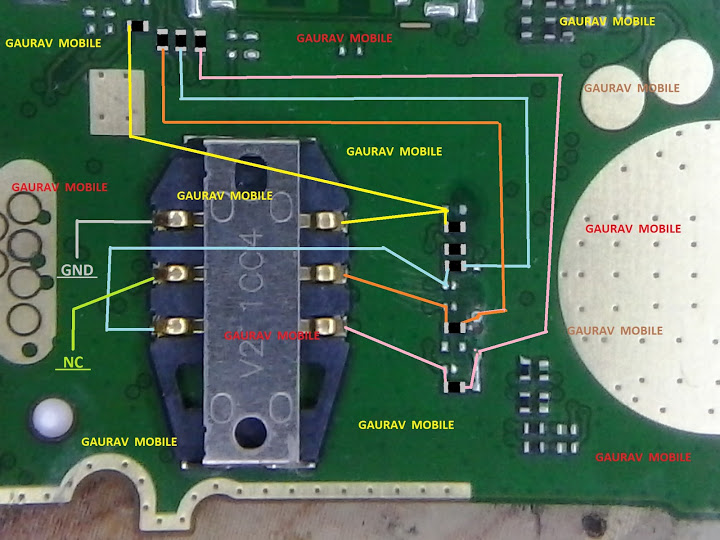
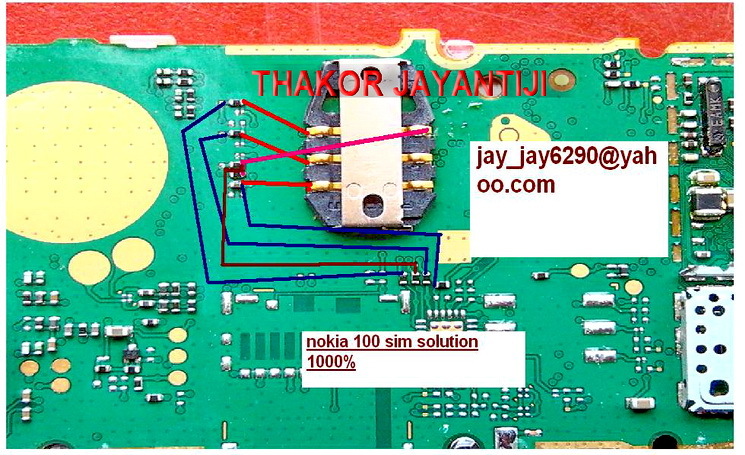
nokia 101 insert sim solution jumper

As most of mobile phones have six point of sim card. In all sim cards sim jack use five prints that are used in sim function. As in given bellow diagram you can see different color lines. These lines are identifying sim point of nokia 101.nokia 111 keypad ic jumper 147 keys not working solution
nokia 101 insert sim solution jumper
Check all these points and track with meter and if any of these prints are missing apply jumpers to solve nokia 101 insert sim solution. Once you have check and apply these sim point jumpers insert sim problem of nokia 101 will be solve easily.

nokia 101 local mode solution 100% tested

nokia 101 local mode solution can be solve with a few easy steps that I am going to post in this article. Keep looking the diagram also that is given bellow in this post.
nokia 110 ringer solution
nokia 101 local mode solution
As in diagram you can see a few resistances in lined with red color. Check these if you find some carbon rust or water damages in it. Make them clean with electronics cleaner and apply heat so that it can be dry. This will help you to solve nokia 101 local mode, nokia 101 test mode problem solution.
You may have to replace these if it can not be solve by cleaning.

nokia 101 ringer solution 100% tested

Nokia 101 Ear Speaker Buzzer Jumper Solution Ways,Nokia 101 Speaker Solution,Nokia 101 Speaker Ways,Nokia 101 Speaker Jumper,Nokia 101 Speaker Problem Repair. All these problems can be cause of water damages, carbon or rust.Nokia 111 Network Problem Solution Jumper Ways
nokia 101 ringer solution
Burn parts can be the reason of all ringer problems in it. So keep looking at the diagram above and look all these parts on the mother board find out water damages and make it clean with electronics cleaner.
Check all these tracks with meter and if any of them is missing apply these jumpers as given in above diagram.

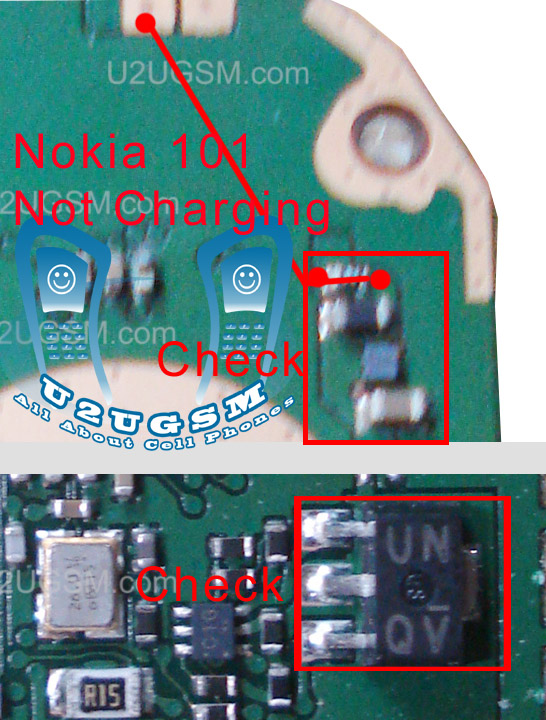
nokia 101 not charging problem jumper solution

nokia 101 not charging problem ways,Nokia 101 Charging Jumper,Nokia 101 Charge Track Ways,Nokia 101 Not Charging,Nokia 101 Charging Solution,Nokia 101 Charging Problem. All these charging problem can be cause of water damages, carbon and burn parts.
Nokia 111 light problem solution with jumpers
nokia 101 not charging problem jumpers
Parts may have been damaged.Not charging on the nokia 101 caused by many things such as broken lines, broken fuse, faulty resistors, IC damaged. Well in this post I will try to share with you a simple trick.
Check the fuse and all other tracks as given in above diagram. If any of them is missing apply jumpers to that part.

nokia 101 lcd ways jumpers solution

Nokia 101 LCD Display Solution Jumper Ways,Nokia 101 LCD Display Solution By Jumper,Nokia 101 LCD Display Solution,Nokia 101 101 LCD Display Problem.All these display problems can be cause of water damages, carbon and burn parts.
Nokia 111 light problem solution with jumpers
nokia 101 lcd ways jumpers
Parts may have been damaged. Keep check all these tracks that are given in above diagram to solve display problems in nokia 101. If you find out missing parts replace them and if any tracks is not working then apply jumpers as shown in diagram.

nokia 101 ear speaker problem

nokia 101 ear speaker problem jumpers are given in diagram that is attached with this post. You can see jumper ways and tracks in it.Check all these path and if any of them is missing then apply jumpers as given in it.
nokia 101 ear speaker problem
In above two lines are given one is blue and the other is red. Both lines are used in ear peace speaker function of nokia 101. and these paths that are identified in the diagram.

nokia 101 speaker not working solution

nokia 101 speaker not working problem can be cause of water damages. It may can be due to damage and burn parts.In repairing diagram bellow some parts and tracks are identified. All these path and parts are used in Speaker function of nokia 101.
nokia 101 speaker not working
Both red and blue color lines are showing tracks to solve nokia 101 speaker ear peace problem. check all these points and if any of these path is missing apply jumpers as shown in above speaker repairing diagram for nokia 101.

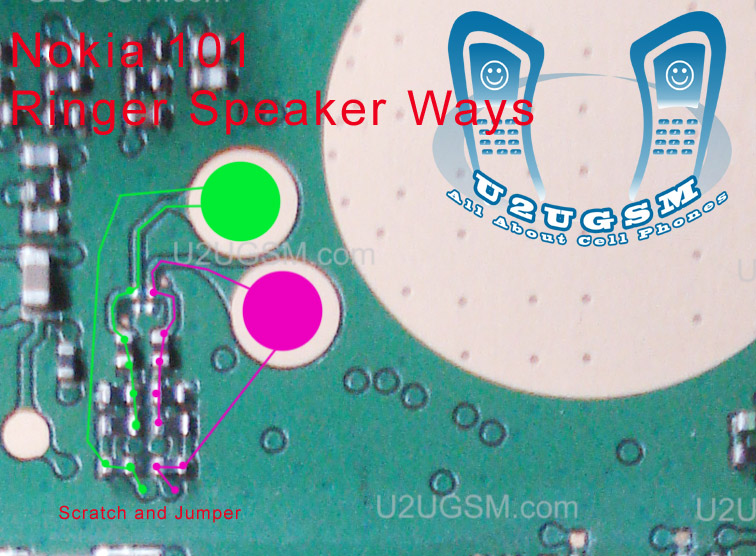
nokia 101 ringer jumper

nokia 101 ringer jumpers are given in this post to solve ringer problem in nokia 101.as in diagram bellow you can see blue and red lines. these lines are given to identify the tracks that are used in ringer function of nokia 101.
nokia 101 ringer jumper
Check all these parts that are shown in above diagram and if you find missing track or damge parts replace them and apply jumpers as given in nokia 101 ringer jumper diagram.

nokia 101 light problem solution

If you have nokia 101 light problem and want to solve it you can solve the problem by following a few steps that are given in bellow diagram. For Nokia 101 light problem solution dis assambly the mobile phone and find out if there is some carbon.nokia 101 insert sim solution
nokia 101 light problem solution
If you find out water damages in it apply electronics cleaner and make it clean. With hot air make it dry and keep in mind do not apply much heat it can harm your skin and may can damage the mother board.
In diagram you can see three simple steps in first step remove parts and in second apply jumpers as given in it. Third parts is also about the jumper.
these jumpers will solve nokia 101 light problem.

nokia 101 sim ways

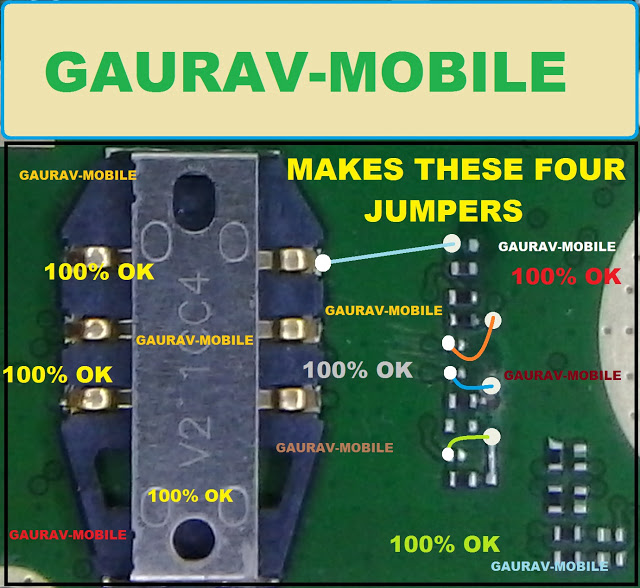
to solve nokia 101 insert sim problem you can read this diagram and follow these jumpers that are given in it.
NOKIA 5230 KEYPAD IC JUMPER KEYPAD SOLUTION
nokia 101 sim ways
In the bellow diagram some differnet color lines are given these lines are the paths of sim points.
check these tracks with meter and if any of them is missing apply these jumpers to solve insert sim problem in nokia 101.
near the resistance you can find out some small points that can be scratch and apply jumpers on these points if resistance is missing.

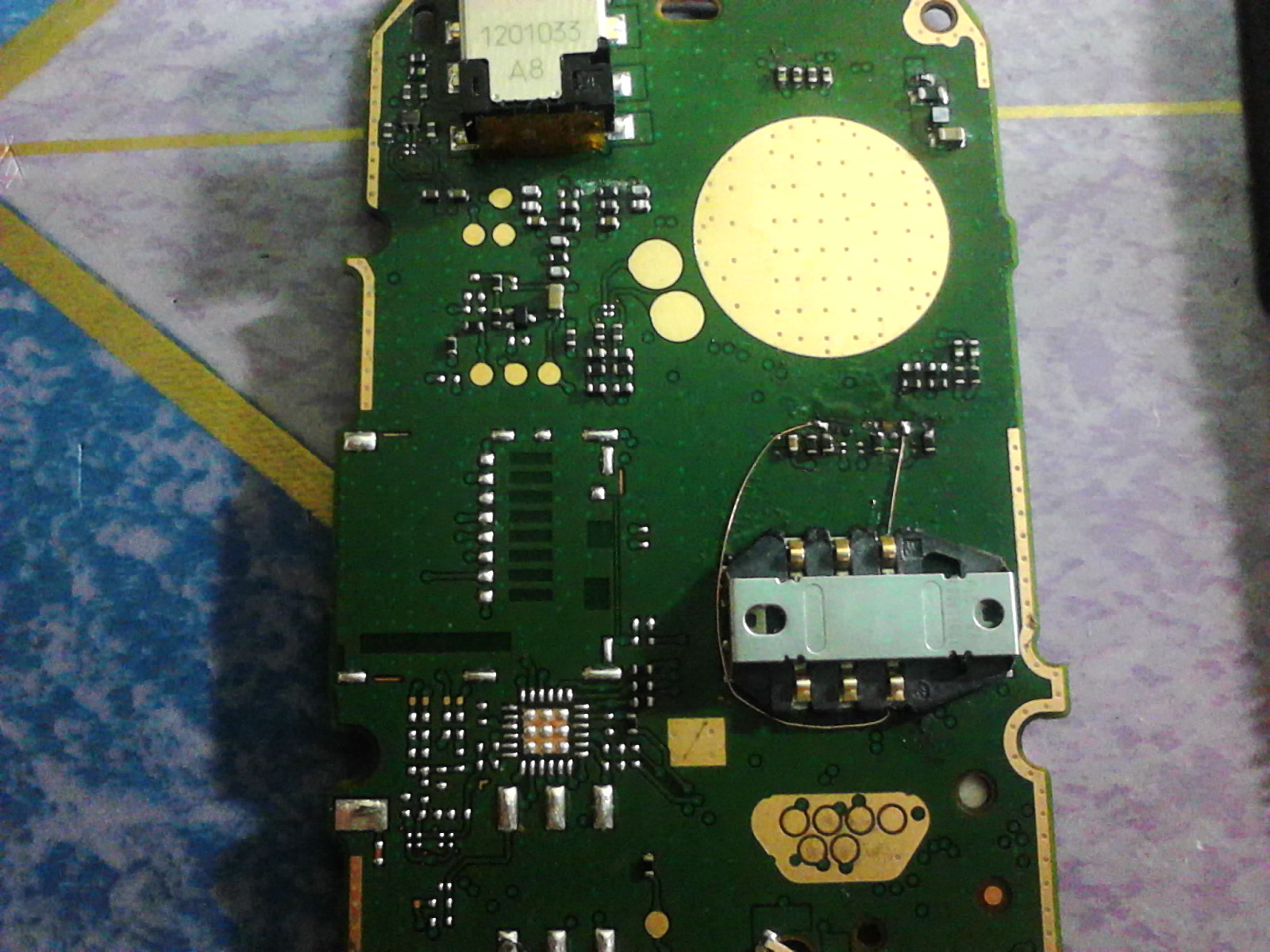
nokia 101 insert sim solution

if you are facing insert sim problem in nokia 101 then this post will help you to solve this issue. Nokia 101 insert sim problem solution is possible by follow this diagram that is given bellwo.
in above diagram you can see a few jumpers check these points with meter and apply jumpers as given in repairing diagram above for insert sim solution of nokia 101.
Nokia X2 Not charging problem solution jumpers
Nokia 5800 insert sim problem solution tested
nokia 101 insert sim solution
you may can check if some parts and components are missing you can replace them with new, you can also check if there is some rust or carbon on the mother board if you find carbon make the mother board clean and dry with hot air.

Nokia 101 lcd light problem repairing tested solution

nokia 101 light jumper , nokia 101 display light solution , nokia 101 lcd light jumper , nokia 101 lcd light solution, nokia 101 light jampar, nokia 101 light solution, nokia c101 lcd light jumper, nokia 101 display light jumper, nokia 101 lcd light , nokia 101 lcd ways, Nokia 101 lighting prolem gsm.com, nokia c1-00 lcd light problem, nokia 101 lcd problem, display problem in nokia model 101, Nokia c101 light solution nokia 101 light jumper solution, nokia 101 display problem, how to solve nok 101 lcd light solution, light nokia 101, Nokia101lcdlight, nokia101displaylight, Nokia 101 display light soulstion mobile help repairing, nokia c1.00 light problem solution,Nokia Lumia 625 Restore Factory Hard Reset Remove Pattern Lock Nokia 101 lcd light problem repairing tested solution
Nokia 101 lcd light problem repairing tested solution Nokia 101 is one of the most popular mobile phone from Nokia corporation. By so far I know display problem is very common problem of Nokia 101 mobile. Here I have shown a picture which contains Nokia 101 display light problem solution. This hardware solution is tested by many technician world wide. Son I can say it is 101% tested Nokia 101 lcd light

nokia 101 insert sim 1 solution

if nokia 101 insert sim 1 is not working then it can be fault of missing tracks and path. Parts can be damage due to water damage and rust so after dis assemble of mobile phone make it clean with electronics cleaner and apply hot air to make it dry.Nokia C1-01 Hand Free Open Problem Solution Jumper Ways
nokia 101 insert sim 1 solution
In above diagram you can see different color lines that are used in sim functions. Check these tracks with meter and if any of them is missing apply these jumpers to solve insert sim problem in nokia 101.

nokia 101 insert sim problem jumper solution

To solve nokia 101 insert sim problem jumper solution this post will help you very much. This diagram will teach you how simply and easily you can sol insert sim problem in nokia 101.
nokia 101 insert sim problem jumper solution
same as jumpers are given in above diagram you can apply on the mother board and you can solve insert sim problem in nokia 101 with a few jumpers.
all jumper point are given in different colors so tat you can identify them easlily.

Nokia 101 White Display 100% Tested Solution

Nokia 101 White Display Problem Repairing Solutions are available in the following article. Also you will find Nokia 101 Display Ways and Jumpers information in the diagrams further in this post.
Nokia 101 White Display Problem
Nokia 101 White Display Solution
Nokia 101 Blank Display
Please Note that we will edit these solutions or add new ones if found in this page at any time in the future. So feel free to come back any time on this page to stay up to date.
Here Are Nokia 101 White Display Problem Solution. Please Observe Carefully.


If you have further Questions please don’t hesitate to leave a comment.

Nokia 101 flashing ok but set is dead 100% working solution..

states of the phone is dead ...

flashing with atf ,

flashing is ok but one error is show (lcd test failed )


VBATT Powering Down <<<<
VBATT Powering Up >>>>
SET VCCIO Level Done
SET BSI Load Done

Booting Phone...
CPU ID Response: A200341100
CPU Type: XG110 2.1B
Phone Booted at after First attempt...

************************************************** ****
TIME STARTS HERE
************************************************** ****


Sending PBL 19456 bytes...
PBL Successfully Sent...

Sending SBL 65024 bytes...
SBL Successfully Sent...

Flash Chip Manufacturer: STMicroelectronics
Flash Chip Type: M58WR064 64 Mbit (4Mb x 16) NOR
Extended Information: Multiple Bank / Burst / 1.8v

Processing Image File: C:\Program Files\Nokia\Phoenix\Products\RM-769\rm769_007.200

FIRMWARE Image Found...
Number of Sections: 03
FIRMWARE Certificate Block Sent Successfully...
Processing Section 01 of 03
FIRMWARE Erase Block: 0x00000000~0x0001FFFE
Start Erasing...
Erasing Please Wait...
Block Erase Done...
Preparing Data Blocks...
Data Size: 24576 bytes
Data Checksum: F5BE
Uploading Data Blocks to phone...
FIRMWARE Data Blocks uploaded to phone...
Processing Section 02 of 03
FIRMWARE Erase Block: 0x00800000~0x00BFFFFE
Start Erasing...
Erasing Please Wait...
Block Erase Done...
Preparing Data Blocks...
Data Size: 4128768 bytes
Data Checksum: BFB7
Uploading Data Blocks to phone...
FIRMWARE Data Blocks uploaded to phone...
Processing Section 03 of 03
FIRMWARE Erase Block: 0x00C5D000~0x00E5FFFE
Start Erasing...
Erasing Please Wait...
Block Erase Done...
Preparing Data Blocks...
Data Size: 1697536 bytes
Data Checksum: 2B05
Uploading Data Blocks to phone...
FIRMWARE Data Blocks uploaded to phone...
Start Data Verification... (Please wait)
Data Verification Successful...


Processing Image File: C:\Program Files\Nokia\Phoenix\Products\RM-769\rm769_007.20mh

PPM Image Found...
Number of Sections: 01
PPM Certificate Block Sent Successfully...
Processing Section 01 of 01
PPM Erase Block: 0x00100000~0x0061813E
Start Erasing...
Erasing Please Wait...
Block Erase Done...
Preparing Data Blocks...
Data Size: 5341504 bytes
Data Checksum: 47D8
Uploading Data Blocks to phone...
PPM Data Blocks uploaded to phone...
Start Data Verification... (Please wait)
Data Verification Successful...


Processing Image File: C:\Program Files\Nokia\Phoenix\Products\RM-769\rm7690_nai07.20mh_nlt

CONTENT Image Found...
Number of Sections: 01
CONTENT Certificate Block Sent Successfully...
Processing Section 01 of 01
CONTENT Erase Block: 0x00E60000~0x00F49FFE
Start Erasing...
Erasing Please Wait...
Block Erase Done...
Preparing Data Blocks...
Data Size: 958464 bytes
Data Checksum: BB37
Uploading Data Blocks to phone...
CONTENT Data Blocks uploaded to phone...
Start Data Verification... (Please wait)
Data Verification Successful...


Exit Flash Mode Done...
Time Elapse : 00:04:32

************************************************** ****
You must Factory Reset the phone to enable the
ringtones and other customized settings to work
************************************************** ****


Waiting For Phone to go Online...

5, 4, 3, 2, 1...
MCU: V 07.20 30-03-12 RM-769 (c) Nokia
IMEI: 353654055460122
Product Serial Number: 3D65DAFBI
Product Code : 059J2D0
Module Code : 0204874
Basic Production Code: 059P5G1
PPM SW Version : V 07.20 30-03-12 RM-769 (c) Nokia MH
ADSP Version : p+V 07.20\n30-03-12\nRM-769\n(c) NMP\nmh_nlt
MCU SW Version : V 07.20 30-03-12 RM-769 (c) Nokia
HW Version : 3000
UEM Version : 1328
UPP Version : 8850
LCD Version : UNKWN: IDs: 00:00:00
********** SIMLOCK INFO **********
CONFIG_DATA : 0010100000000000
PROFILE_BITS : 0000000000040002
ASIC : 11
PROVIDER : Default Test Operator

Block [1] 1:Open 2:Open 3:Open 4:Open 5:Open
Block [2] 1:Open 2:Open 3:Open 4:Open 5:Open
Block [3] 1:Open 2:Open 3:Open 4:Open 5:Open
Block [4] 1:Open 2:Open 3:Open 4:Open 5:Open
Block [5] 1:Open 2:Open 3:Open 4:Open 5:Open
Block [6] 1:Open 2:Open 3:Open 4:Open 5:Open
Block [7] 1:Open 2:Open 3:Open 4:Open 5:Open
ST_LCD_TEST : FAILED

Phone Cannot Enter Normal Mode if LCD
is Damaged or LCD is not Properly
Connected to the Main PCB


FACTORY SET TO : Full Factory Set
OK
FACTORY SET TO : User Data
OK
FACTORY SET TO : Leave Factory
OK
FACTORY SET TO : Service Center
OK
FACTORY SET TO : Software Upgrade
OK
FACTORY SET TO : Production Tune
OK

apply this jumber.. 100% working.....


phone is on condeshion.....

Nokia 101 RH-131 V 4.30 latest flash files

Nokia 101 RH-131 Version 4.30 latest flash files Free direct download only 3 files MCU,PPM,CNT just click on file for direct download


Latest Version 4.30
1) MCU
2) PPM
3) CNT
Version 4.10
1) MCU
2) PPM
3) CNT

Related Posts Plugin for WordPress, Blogger...

All Gsm Solution Headline Animator

Blogger Tips and TricksLatest Tips And TricksBlogger Tricks

Please Log in