Showing posts with label Nokia 100. Show all posts

nokia 100 charging problem solution

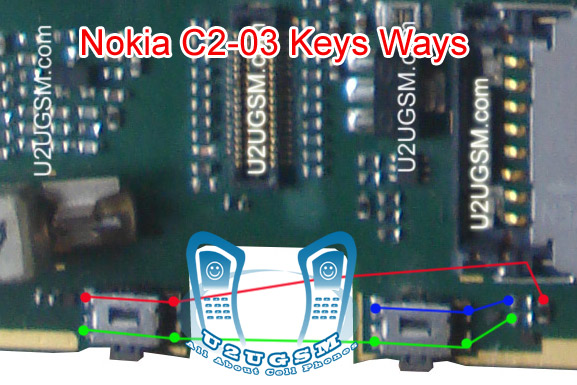
1-Nokia C2-06 Volume Up Key is Not Working.
2-Nokia C2-06 Volume Down Key is Not Working.
Tools:-
1-Hot Air is required.
2-Solding iron is required.
3-Skrue driver keys.
4-Electronics cleaner.
5-Four leg On of Switch ( Volume Key Switch ).
6-old board of Nokia C2-06 if a few parts are damage in this board.So that they can be replaced.
Nokia 5233 insert sim problem solution tested
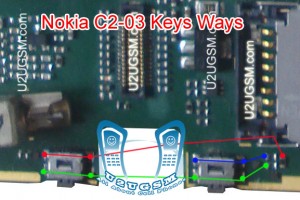
Nokia C2-06 Voluem Up Down Keys Not Working Problem Solution Jumpers
Solution:-
If Volume Up or Down key is not working in Nokia C2-06 then it can be the cause of Volume Switch or Resistance near by it.
So disassemble mobile phone and check whole mother board.
If there is some rust or carbon clean it with electronics cleaner and apply some heat so that it can be dry.
Check these tracks as shown in red and green lines in above diagram.
If some prints are missing or a few parts are damage apply jumpers or replace damaged parts.
If Volume Switch is damage or broken then replace it with new one.
Warnings:
Do not apply much heat it can be harm for your skin and mobile phone.
Try that board get fully dry.
When you are removing old volume switch make sure you will not damage prints from mother board so remove it when solding iron is too much hot.Or remove it with hot air.
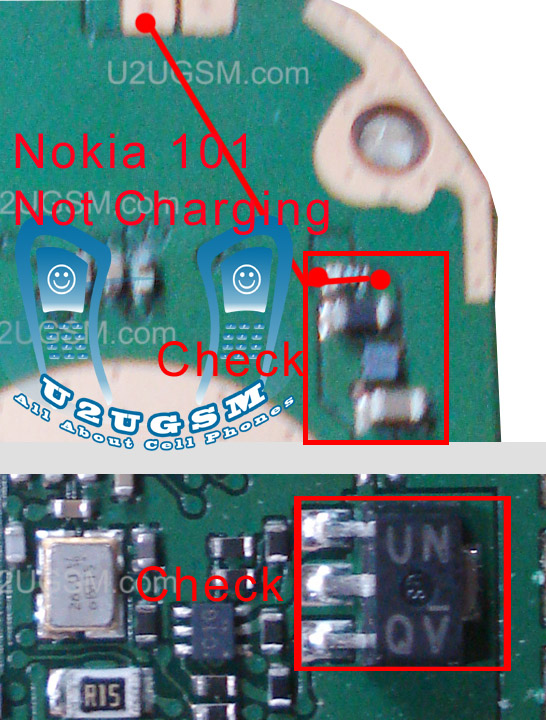
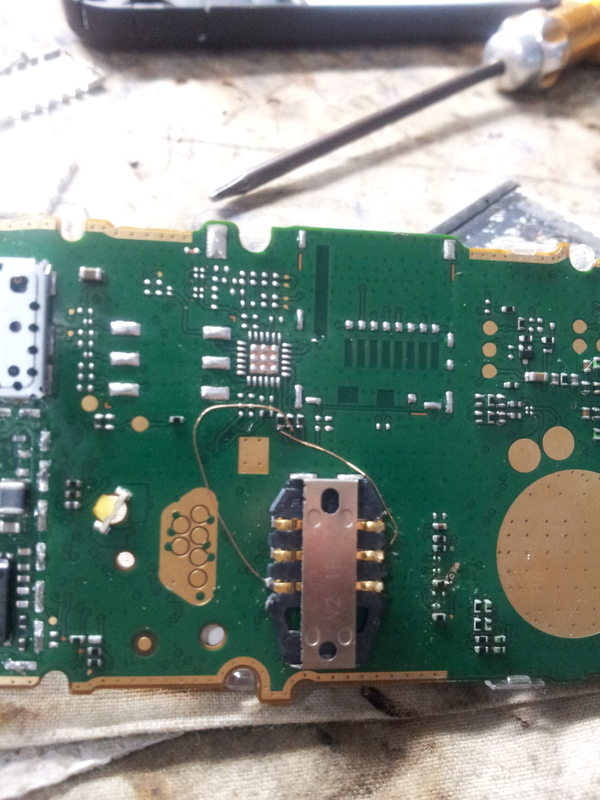
Nokia 100 Not Charging Problem Solution Jumper Ways

Not Charging in Nokia 100, Charger Not Supported, Charger not working in Nokia 100, Fack charging.
Tools:-
Extra Charger for diagnostic.
Nokia Key T4 and T5 for disassemble.
Electronics Cleaner for cleaning carbon or water damages.
Hot air to dry the mother board.
Solding Iron for applying jumpers.Nokia 5250 fake charging not save battery problem solution
Nokia 100 Not Charging Problem Solution Jumper Ways

Solution & Diagnostics:-
Plugin charger pin into charging jack of nokia 100.
If charger is not working and you do not see any error at Nokia 100 screen it can be due to missing component or damaged.
If the error is Not charging or charger not supported it can be cause of charging ic and missing values.
Disassemble the mobile phone and look at the mother board.
Change charging pin and try again if above steps do not solve charging problem try bellow.
If there is some rust or carbon then apply electronics cleaner and clean it.
Apply hot air to make it dry and test again.
Different color lines are given to indicate whole track and paths of charging function in Nokia 100.
Check all points that are described in above diagram and if any track out of them is missing apply jumpers as shown in above diagram for solving charging problem in Nokia 100.
You may have to change charging IC.
Warnings & Tips:-
Do not apply much heat with hot air it can be harm for your skin.
Apply jumpers carefully so that it would not be short with other.
After cleaning with cleaner make it dry proper.
for more detail and new tips and tricks about cellphone service problem keep visiting this page we will update cellphone service diagrams timely with new cellphone diagrams.some related post are also given bellow you can read them also for more information about cellphone.

nokia 100 sim jumper 100% tested solution

In this post you can see nokia 100 insert sim jumpers these jumpers will solve sim problem of nokia 100.Nokia 5250 Touch Screen Problem Solution Jumper Ways .
nokia 100 sim jumper
in above diagram you can see a few jumpers that are used to for nokia 100 insert sim problem solution. Check these path with meter and apply jumpers if any of these is missing.
check these resistance and if any of them is missing you can scratch point near by them and apply jumpers there also.

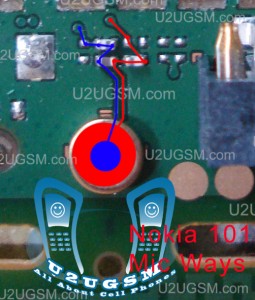
Nokia 100 Mic Problem Solution Jumper Ways

Mic Problem in Nokia 100, Mic is not working, Low Mic voice to destination,Microphone problem.
Tools:-
Nokia Key T4 and T5 for disassemble.
Electronics Cleaner for cleaning carbon or water damages.
Hot air to dry the mother board.
Solding Iron for applying jumpers.Nokia C2-03 Not Charging Problem jumpers Ways Solutions
Nokia 100 Mic Problem Solution Jumper Ways
Solution & Diagnostics:-
Disassemble the mobile phone and look at the mother board.
If there is some rust or carbon then apply electronics cleaner and clean it.
Apply hot air to make it dry and test again.
Try with replacing mic with new one.
Check microphone point on the mother board and if value did not exist.
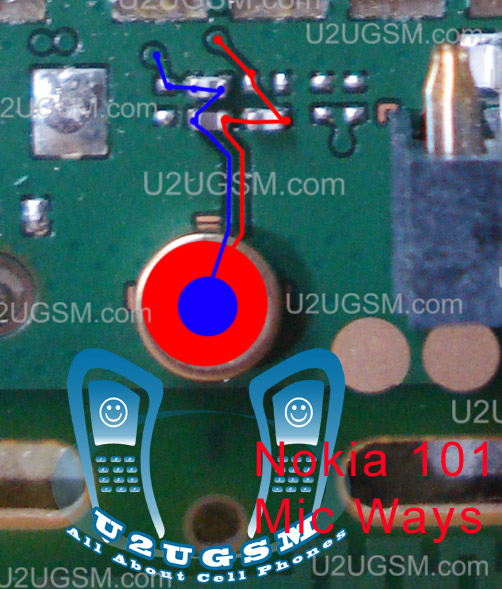
Different color lines are given to indicate whole track and paths of mic ( microphone ) function in Nokia 100.
Check all points that are described in above diagram and if any track out of them is missing apply jumpers as shown in above diagram for solving mic problem in Nokia 100.
You may have to change audio IC.
Warnings & Tips:-
Do not apply much heat with hot air it can be harm for your skin.
Apply jumpers carefully so that it would not be short with other.
After cleaning with cleaner make it dry proper.
for more detail and new tips and tricks about cellphone service problem keep visiting this page we will update cellphone service diagrams timely with new cellphone diagrams.some related post are also given bellow you can read them also for more information about cellphone.

nokia 100 sim jumper 100% tested solution

In this post you can see nokia 100 insert sim jumpers these jumpers will solve sim problem of nokia 100.Nokia C1-01 network problem solution jumper ways
nokia 100 sim jumper
in above diagram you can see a few jumpers that are used to for nokia 100 insert sim problem solution. Check these path with meter and apply jumpers if any of these is missing.
check these resistance and if any of them is missing you can scratch point near by them and apply jumpers there also.

nokia 100 insert sim solution jumper

As most of mobile phones have six point of sim card. In all sim cards sim jack use five prints that are used in sim function. As in given bellow diagram you can see different color lines.Nokia 1616 Light Problem Solution with Jumpers
nokia 100 insert sim solution jumper
These lines are identifying sim point of nokia 100.
Check all these points and track with meter and if any of these prints are missing apply jumpers to solve nokia 100 insert sim solution. Once you have check and apply these sim point jumpers insert sim problem of nokia 100 will be solve easily.

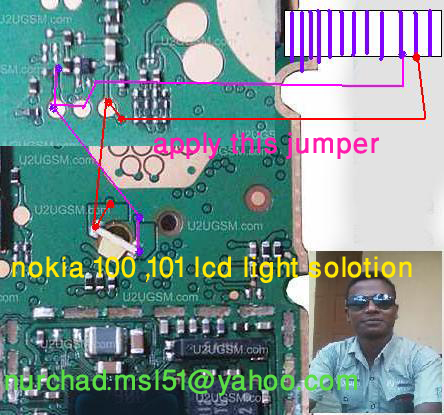
nokia 100 lcd light solution

Nokia 100 lcd light problem solution can be solve by applying these jumpers. Light problem in Nokia 100 can be cause of water damages.Nokia 1280 Light Problem Solution with Jumpers
nokia 100 lcd light solution
as you can find a few different color tracks you have to check these track with meter to solve nokia 100 lcd light problem solution. if any of them is missing apply these jumpers as given in above diagram to solve light problem in nokia 100.

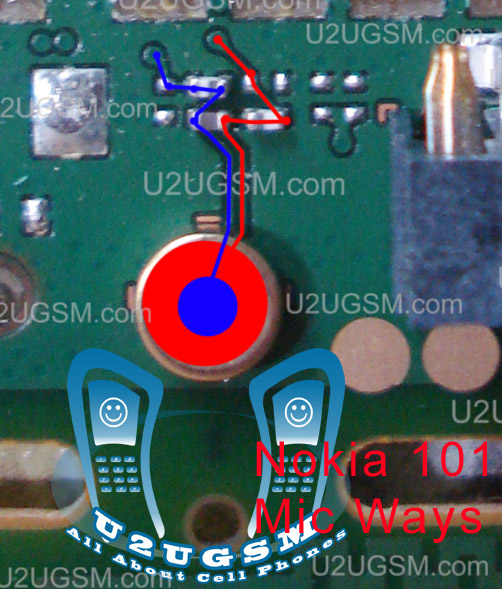
nokia 100 mic problem solution

if you are facing nokia 100 mic problem. and want to solve it with jumpers. Nokia mic problem solution jumpers are given in this post. In this diagram you can see two different color lines.nokia 111 network solution
nokia 100 mic problem solution-s
Red color and blue color lines are given as tracks of mic ways. Check these path and apply jumpers if any of these links is missing.
After you have changed the mic and check these mic prints and ways mic problem will be solve easily.This diagram will help you to solve nokia 100 mic problem solution.

nokia 100 local mode solution

nokia 100 local mode solution can be solve with a few easy steps that I am going to post in this article. Keep looking the diagram also that is given bellow in this post.
nokia 111 lcd light jumper solution
nokia 100 local mode solution
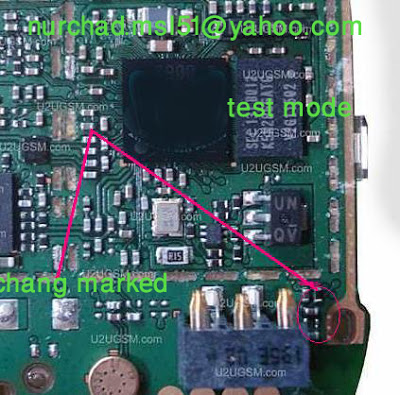
As in diagram you can see a few resistances in lined with red color. Check these if you find some carbon rust or water damages in it. Make them clean with electronics cleaner and apply heat so that it can be dry. This will help you to solve nokia 100 local mode, nokia 100 test mode problem solution.
You may have to replace these if it can not be solve by cleaning.

nokia 100 not charging problem jumpers

nokia 100 not charging problem ways,Nokia 100/101 Charging Jumper,Nokia 100/101 Charge Track Ways,Nokia 100/101 Not Charging,Nokia 100/101 Charging Solution,Nokia 100/101 Charging Problem. All these charging problems can be cause of water damages, carbon and burn parts.
nokia 111 ringer jumper solution
nokia 100 not charging problem jumpers
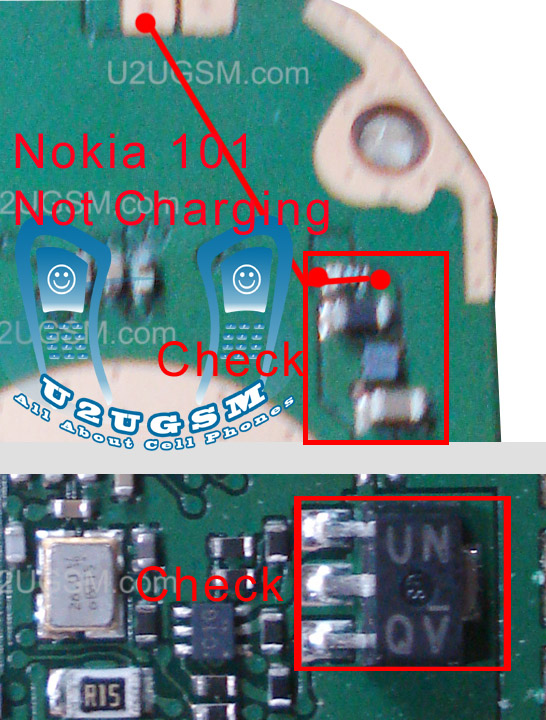
Parts may have been damaged.Not charging on the nokia 100 caused by many things such as broken lines, broken fuse, faulty resistors, IC damaged. Well in this post I will try to share with you a simple trick.
Check the fuse and all other tracks as given in above diagram. If any of them is missing apply jumpers to that part.

nokia 100 lcd ways jumpers solution 100% tested

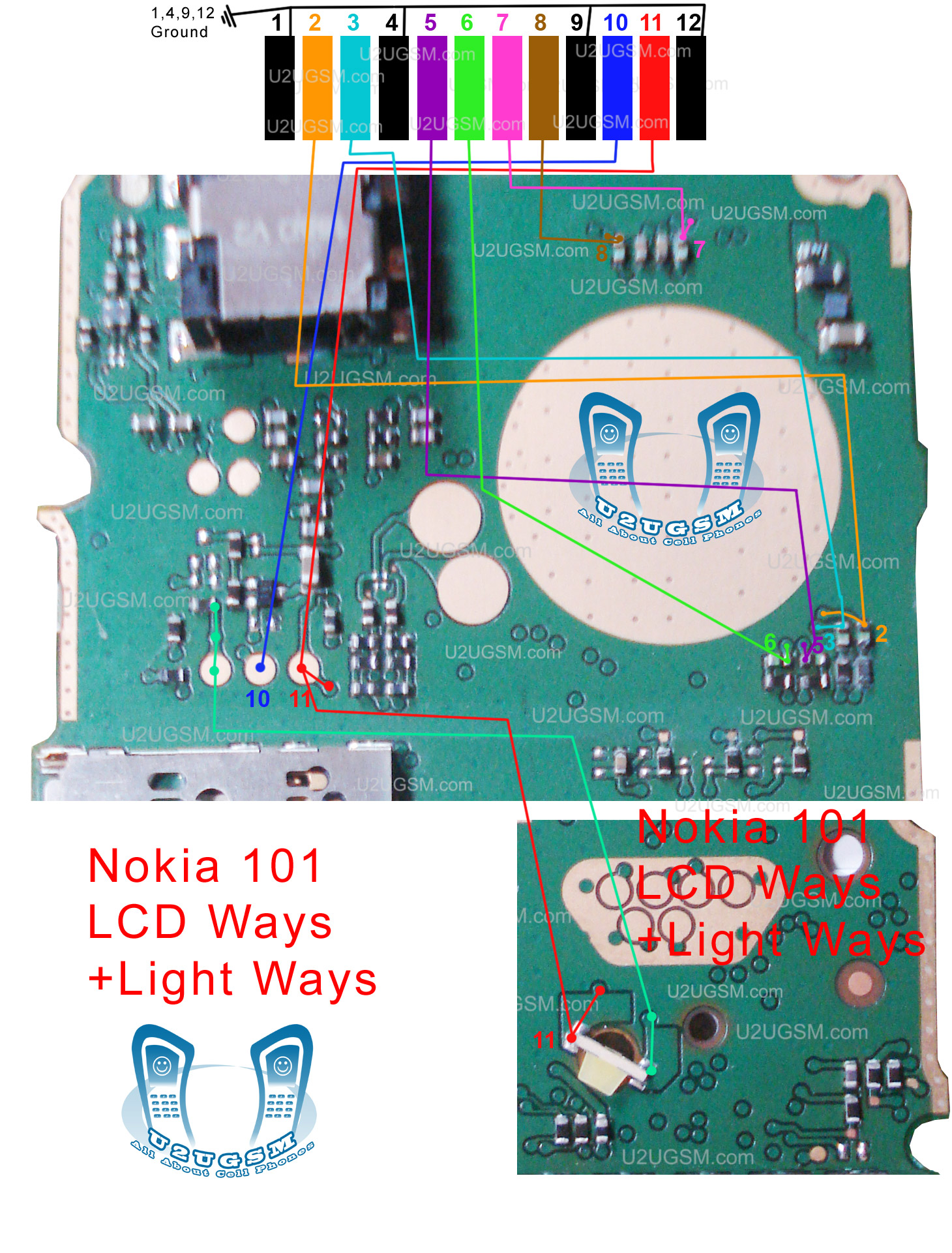
Nokia 100 101 LCD Display Solution Jumper Ways,Nokia 100 101 LCD Display Solution By Jumper,Nokia 100 101 LCD Display Solution,Nokia 100 101 LCD Display Problem.All these display problems can be cause of water damages, carbon and burn parts.
nokia 111 ringer solution
nokia 100 lcd ways
Parts may have been damaged. Keep checck all these tracks that are given in above diagram to solve display problems in nokia 100. If you find out missing parts replace them and if any tracks is not working then apply jumpers as shown in diagram.

nokia 100 speaker not working solution

nokia 100 speaker not working problem can be cause of water damages. It may can be due to damage and burn parts.In repairing diagram bellow some parts and tracks are identified. All these path and parts are used in Speaker function of nokia 100.
nokia 100 speaker not working
Both red and blue color lines are showing tracks to solve nokia 100 speaker ear peace problem. check all these points and if any of these path is missing apply jumpers as shown in above speaker repairing diagram for nokia 100.

nokia 100 ringer jumper

nokia 100 ringer jumpers are given in this post to solve ringer problem in nokia 100.as in diagram bellow you can see blue and red lines. these lines are given to identify the tracks that are used in ringer function of nokia 100.
nokia 100 ringer jumper
Check all these parts that are shown in above diagram and if you find missing track or damge parts replace them and apply jumpers as given in nokia 100 ringer jumper diagram.

nokia 100 charging ways

nokia 100 charging ways are given in this diagram that is posted in this post. So find out these tracks and apply jumpers if any of them is missing.
nokia 100 charging ways
In repairing diagram above you can see blue and red lines. These lines are the path of parts used in charging function.If you find damage or burn parts then replace them to solve nokia 100 charging problem.

nokia 100 charging solution

nokia 100 charging solution.nokia 100 charging problem solution
nokia 100 charging
nokia 100 charging jumper solution
nokia x2-00 not charging solution
nokia 100 not charging jumper
samsung GT-E 2130
nokia 100 charging way
nokia 100 charger not supported
nokia 100 charging ic
nokia 100 charging track
nokia 100 charging solution
nokia 100 charging fault
images repair Nokia Not Charging 100
Nokia 100 charging problem
NOKIA 100CHARGING PROBLEM SOLUTION
nokia100 charging prob
repair nokia 100 charger
n 100 charging problem solution
nokia 100 blue print
www nokia 100 charging problem
nokia 101 not charging problem solution video

nokia 100 ear speaker problem

nokia 100 ear speaker problem jumpers are given in diagram that is attached with this post. You can see jumper ways and tracks in it.Check all these path and if any of them is missing then apply jumpers as given in it.
nokia 100 ear speaker problem
In above two lines are given one is blue and the other is red. Both lines are used in ear peace speaker function of nokia 100. and these paths that are identified in the diagram.

Nokia 100 Dead and Not switch On with Battery

If you have a Nokia 100 Dead problem and it can not be switch on power on with battery but can be on with dc power supply then you can try this solution. look at the diagram given bellow in this post.
Nokia 5230 charging not support solution tested 
Nokia 100 Ringer Problem Solution Jumper Ways

You can see two red box in picture one of them is showing text remove so remove that resistance and other one you have to replace. check battery terminals also because in some cases it can be water damage or carbon on it.
So if you see some carbon or rust then clean the board and battery terminals with electronics cleaner and dry for a few mints with hot air or under electrical bulb.
for more detail and new tips and tricks about cellphone service problem keep visiting this page we will update cellphone service diagrams timely with new cellphone diagrams.some related post are also given bellow you can read them also for more information about cellphone.

Nokia 100 Ringer Problem Solution Jumper Ways

Ringer Problem, Ringer not working, Low Ringer Voice, Ringer is not Ringing in Nokia 100,
Tools:-
Extra Ringer for diagnostic.
Nokia Key T4 and T5 for disassemble.
Electronics Cleaner for cleaning carbon or water damages.
Hot air to dry the mother board.
Solding Iron for applying jumpers.Nokia 5230 mic not working problem solution jumper ways
Nokia 100 Ringer Problem Solution Jumper Ways

Solution & Diagnostics:-
Disassemble the mobile phone and look at the mother board.
If there is some rust or carbon then apply electronics cleaner and clean it.
Apply hot air to make it dry and test again.
Try to solve the problem with inserting new Ringer and check. If it is working problem can be solve with Ringer changes only.
If the above step do not solve Ringer problem then test bellow steps.
Different color lines are given to indicate whole track and paths of ringer function in Nokia 100.
Check all points that are described in above diagram and if any track out of them is missing apply jumpers as shown in above diagram for solving ringer problem in Nokia 100.
You may have to change ringer IC that is near by the ringer points.
Warnings & Tips:-
Do not apply much heat with hot air it can be harm for your skin.
Apply jumpers carefully so that it would not be short with other.
After cleaning with cleaner make it dry proper.
for more detail and new tips and tricks about cellphone service problem keep visiting this page we will update cellphone service diagrams timely with new cellphone diagrams.some related post are also given bellow you can read them also for more information about cellphone.

Nokia 100 Not Charging Problem Solution Jumper Ways

Not Charging in Nokia 100, Charger Not Supported, Charger not working in Nokia 100, Fack charging.
Tools:-
Extra Charger for diagnostic.
Nokia Key T4 and T5 for disassemble.
Electronics Cleaner for cleaning carbon or water damages.
Hot air to dry the mother board.
Solding Iron for applying jumpers.Nokia 5230 memory card corrupted MMC problem solution
Nokia 100 Not Charging Problem Solution Jumper Ways

Solution & Diagnostics:-
Plugin charger pin into charging jack of nokia 100.
If charger is not working and you do not see any error at Nokia 100 screen it can be due to missing component or damaged.
If the error is Not charging or charger not supported it can be cause of charging ic and missing values.
Disassemble the mobile phone and look at the mother board.
Change charging pin and try again if above steps do not solve charging problem try bellow.
If there is some rust or carbon then apply electronics cleaner and clean it.
Apply hot air to make it dry and test again.
Different color lines are given to indicate whole track and paths of charging function in Nokia 100.
Check all points that are described in above diagram and if any track out of them is missing apply jumpers as shown in above diagram for solving charging problem in Nokia 100.
You may have to change charging IC.
Warnings & Tips:-
Do not apply much heat with hot air it can be harm for your skin.
Apply jumpers carefully so that it would not be short with other.
After cleaning with cleaner make it dry proper.
for more detail and new tips and tricks about cellphone service problem keep visiting this page we will update cellphone service diagrams timely with new cellphone diagrams.some related post are also given bellow you can read them also for more information about cellphone.

Nokia 100 Mic Problem Solution Jumper Ways

Mic Problem in Nokia 100, Mic is not working, Low Mic voice to destination,Microphone problem.
Tools:-
Nokia Key T4 and T5 for disassemble.
Electronics Cleaner for cleaning carbon or water damages.
Hot air to dry the mother board.
Solding Iron for applying jumpers.Nokia C1-01 speaker ear piece problem solution jumper ways
Nokia 100 Mic Problem Solution Jumper Ways
Solution & Diagnostics:-
Disassemble the mobile phone and look at the mother board.
If there is some rust or carbon then apply electronics cleaner and clean it.
Apply hot air to make it dry and test again.
Try with replacing mic with new one.
Check microphone point on the mother board and if value did not exist.
Different color lines are given to indicate whole track and paths of mic ( microphone ) function in Nokia 100.
Check all points that are described in above diagram and if any track out of them is missing apply jumpers as shown in above diagram for solving mic problem in Nokia 100.
You may have to change audio IC.
Warnings & Tips:-
Do not apply much heat with hot air it can be harm for your skin.
Apply jumpers carefully so that it would not be short with other.
After cleaning with cleaner make it dry proper.
for more detail and new tips and tricks about cellphone service problem keep visiting this page we will update cellphone service diagrams timely with new cellphone diagrams.some related post are also given bellow you can read them also for more information about cellphone.
Related Posts Plugin for WordPress, Blogger...

All Gsm Solution Headline Animator

Blogger Tips and TricksLatest Tips And TricksBlogger Tricks

Please Log in